
 Operators Guide



Configure offline conversion events for Pinterest
Pinterest is a visual discovery engine on which your brand can engage with your customers. Send a list of products that are in your product catalog to Pinterest to enable pins, and then send a list of customers with whom your brand wants to engage.
Send events to Pinterest Ads Manager to help your brand track offline conversions that result from your marketing campaigns and improve return on ad spend (ROAS) and cost per acquisition (CPA) reporting performance within Pinterest Ads Manager.
Only events that occurred within the previous seven days may be sent to Pinterest Ads Manager using the Send conversions endpoint in the Pinterest Ads Manager Conversions API.
Note
Offline conversion events require up to 48 hours for deduplication of events within Pinterest Ads Manager.
Caution
The values for email, phone, given_name, surname, city, state, postal, country, birthdate, gender, and extern_id sent to Pinterest Ads Manager are SHA-256 hashed automatically by Amperity before sending. Do not use the TO_HEX() function with the email, phone, given_name, surname, city, state, postal, country, birthdate, gender, and extern_id fields for queries that return results for Pinterest Ads Manager.
Get details
Review the following details before configuring credentials for Pinterest Ads Manager and before configuring Amperity to send offline conversion events to Pinterest Ads Manager.

|
Credential settings Conversion access token
|
|
|
Pinterest settings Ad account ID
|
|
|
Request properties
|
Configure credentials
Configure credentials for Pinterest Ads Manager before adding a destination.
An individual with access to Pinterest Ads Manager should use SnapPass to securely share “conversion access token” details with the individual who configures Amperity.
To configure credentials for Pinterest events

|
From the Settings page, select the Credentials tab, and then click the Add credential button. |
|
In the Create credential dialog box, do the following:
|

|
The settings that are available for a credential vary by credential type. For the “pinterest-offline-events” credential type, configure settings, and then click Save. Conversion access token
|
Add destination
Use a sandbox to configure a destination for Pinterest Ads Manager. Before promoting your changes, send a sample audience, and then verify the results in Pinterest Ads Manager. After verifying the end-to-end workflow, push the destination from the sandbox to production.
To add a destination
|
|
Open the Destinations tab to configure a destination for Pinterest Ads Manager. Click the Add Destination button to open the Destination dialog box. Enter the name of the destination and a description. For example: “Pinterest Ads Manager events” and “Send events to Pinterest Ads Manager.”. |
|
|
Credentials allow Amperity to connect to Pinterest Ads Manager. The credential type is set automatically. You may use an existing credential or you may add a new one. Select an existing credential from the Credential dropdown. – or – Select Create a new credential from the Credential dropdown. This opens the Credential dialog box. |
|
|
In the “Destination settings” dialog box, assign the destination a name and description that ensures other users of Amperity can recognize when to use this destination. Configure business user access By default a destination is available to all users who have permission to view personally identifiable information (PII). Enable the Admin only checkbox to restrict access to only users assigned to the Datagrid Operator and Datagrid Administrator policies. Enable the PII setting checkbox to allow limited access to PII for this destination. Use the Restrict PII access policy option to prevent users from viewing data marked as PII anywhere in Amperity and from sending data to downstream workflows. |

|
Configure the following settings, and then click “Save”. Ad account ID
|

|
After configuring this destination users may use orchestrations to send query results Pinterest Ads Manager. |

|
Validate the audience with Pinterest Ads Manager by using a sample audience with a very small membership. For example: 10 or 100 members or the minimum audience size recommended by Pinterest Ads Manager. Send the sample audience to Pinterest Ads Manager and verify the sample audience is correct in Pinterest Ads Manager. Make adjustments if necessary. Only send full audiences after validation is complete. |
Build a query
Use a query to build a combination of data from the Unified Transactions and Customer 360 tables to send offline conversion events to Pinterest Ads Manager.
Review the Conversions API parameters section for detailed information about the columns returned by your query.
A query must return the following parameters: currency, email, timestamp, and value. When value cannot be returned, both price and quantity must be returned.
The query should return the following parameters to improve return on ad spend (ROAS) and cost per acquisition (CPA) reporting performance within Pinterest Ads Manager: currency, extern_id, given_name, surname, and phone.
Important
Amperity adds the following parameters and applies values automatically:
action_source is automatically set to offline
event_id is an automatically generated SHA-256 hash of order_id, event_name, and timestamp
event_name is automatically set to checkout
partner_name is automatically set to ss-amperity
Order-level events
A query that returns a collection of order-level events for use in Pinterest Ads Manager is similar to:
 1SELECT
 2  c360.customer_id AS extern_id
 3  ,c360.given_name AS given_name
 4  ,c360.surname AS surname
 5  ,c360.phone AS phone
 6  ,c360.email AS email
 7  ,c360.city AS city
 8  ,c360.state AS state
 9  ,c360.postal AS postal
10  ,c360.country AS country
11  ,c360.birthdate AS birthdate
12  ,ut.currency AS currency
13  ,ut.order_id AS order_id
14  ,ut.order_quantity AS quantity
15  ,ut.order_datetime AS timestamp
16  ,ut.order_revenue AS price
17FROM Unified_Transactions ut
18LEFT JOIN Customer_360 c360 ON ut.amperity_id = c360.amperity_id
19WHERE ut.order_datetime > (CURRENT_DATE - interval '7' day)
Item-level events
A query that returns a collection of item-level events for use in Pinterest Ads Manager is more complex. Review the tables available in your tenant and review the available parameters in the parameters in the Send conversions to determine which combinations of attributes in your tenant can be mapped to properties in the Send conversions endpoint.
The following example uses the Customer 360, Unified Itemized Transactions, and Unified Transactions tables.
WITH customers AS (
  SELECT
    amperity_id
    ,c360.email AS email
    ,c360.phone AS phone
    ,c360.given_name AS given_name
    ,c360.surname AS surname
    ,c360.city AS city
    ,c360.state AS state
    ,c360.postal AS postal
    ,c360.country AS country
    ,c360.birthdate AS birthdate
    ,c360.customer_id AS extern_id
  FROM Customer_360 c360
  WHERE email IS NOT NULL
  OR phone IS NOT NULL
),

items AS (
  SELECT
    order_id
    ,item_quantity AS quantity
    ,item_revenue AS price
    ,product_id AS item_name
  FROM Unified_Itemized_Transactions
  WHERE is_return IS NULL
  AND is_cancellation IS NULL
  AND item_revenue >= 0
  GROUP BY order_id
),

orders AS (
  SELECT
    ut.amperity_id
    ,ut.order_id
    ,ut.order_datetime AS timestamp
    ,'USD' AS currency
  FROM Unified_Transactions ut
  WHERE ut.amperity_id IS NOT NULL
),

pinterest_events AS (
  SELECT
    ,or.timestamp
    ,c.email
    ,c.phone
    ,c.given_name
    ,c.surname
    ,c.birthdate
    ,c.city
    ,c.state
    ,c.postal
    ,c.country
    ,c.extern_id
    ,or.currency
    ,or.value
    ,it.quantity
  FROM orders or
  JOIN customers c  ON or.amperity_id = c.amperity_id
  LEFT JOIN items it ON or.order_id = it.order_id
)

SELECT *
FROM pinterest_events
ORDER BY timestamp DESC
Offline events parameters
The following table describes each of the parameters that are required by Pinterest Ads Manager for offline events. Refer to the Send conversions endpoint documentation for more information about parameters, making requests, and ensuring that the shape of the data sent to Pinterest Ads Manager from Amperity matches what Pinterest Ads Manager expects to be in the request.
Important
A query must return columns with the same name as listed in the “Amperity name” column in the following table. Amperity converts column names to match the parameter names required by the Send conversions endpoint automatically, as long as the name of field returned by the query matches the expected name.
The fields are listed alphabetically, but may be returned by a query in any order.
Amperity name |
Pinterest parameter |
Description |
|---|---|---|
None. |
action_source |
Automatic The location at which the conversion event occurred. The value for action_source is assigned automatically and is set to offline. |
birthdate |
db |
Optional A birthdate, in YYYYMMDD format. Note db is part of the user_data object in the Send conversions endpoint. Amperity automatically applies SHA-256 hashing to db before sending to Pinterest Ads Manager. |
city |
ct |
Optional A city name, in lowercase with punctuation and spaces removed. Note ct is part of the user_data object in the Send conversions endpoint. Amperity automatically applies SHA-256 hashing to ct before sending to Pinterest Ads Manager. |
country |
country |
Optional A two-character ISO 3166-1 alpha-2 country code, in lowercase. Note country is part of the user_data object in the Send conversions endpoint. Amperity automatically applies SHA-256 hashing to country before sending to Pinterest Ads Manager. |
currency |
currency |
Required Pinterest Ads Manager requires the value for currency to be a three character alphabetic ISO 4217 currency code. For example: “USD”. Use the Currency field in the Unified Transactions table when its values are three character alphabetic ISO 4217 currency codes. Note currency is part of the custom_data object in the Send conversions endpoint. |
em |
Required An email address, in lowercase. Note em is part of the user_data object in the Send conversions endpoint. Amperity automatically applies SHA-256 hashing to em before sending to Pinterest Ads Manager. |
|
None. |
event_id |
Optional A deterministic idenfier created by Amperity that uniquely identifies an offline event. Note The value for event_id helps Pinterest Ads Manager deduplicate events sent from Amperity using the Conversion API with other events captured by Pinterest tracking. Deduplication occurs within 48 hours of receiving events sent to the Conversions API. When an order ID exists, event_id is generated as SHA256(order_id | event_name | event_time)
When an order ID does not exist, event_id is an empty string. Note Amperity automatically applies SHA-256 hashing to event_id before sending to Pinterest Ads Manager. |
None. |
event_name |
Automatic The type of user event. The value for event_name is assigned automatically and is set to checkout. Only checkout event types are supported. |
extern_id. |
external_id |
Required An SHA-256 hashed string that uniquely identifies a user within your customer data. For example: a user ID, a loyalty ID, or a customer ID. Note external_id is part of the user_data object in the Send conversions endpoint. Amperity automatically applies SHA-256 hashing to external_id before sending to Pinterest Ads Manager. |
gender |
ge |
Optional A gender identifier, in lowercase. Must be one of “f”, “m”, or “n” for non-binary gender. Note ge is part of the user_data object in the Send conversions endpoint. Amperity automatically applies SHA-256 hashing to gender. |
given_name |
fn |
Optional A first name, in lowercase. Note fn is part of the user_data object in the Send conversions endpoint. Amperity automatically applies SHA-256 hashing to fn before sending to Pinterest Ads Manager. |
Varies. |
opt_out |
Optional Indicates when a user has opted out of tracking for web conversion events or ad personalization in Pinterest Ads Manager. Note Opt out data is available from data sources that capture when users
|
None. |
opt_out_type |
Required when opt_out is “true”. Use opt_out_type for situations where a customer’s opt_out preference is known. When the opt_out parameter is “true” the value of opt_out_type must be “ldp”. When opt_out_type is “ldp” Pinterest Ads Manager enforces limited data processing . |
order_id |
order_id |
Recommended The unique identifier for an order. Pinterest Ads Manager uses order IDs, when available, for deduplicating events. Note When an order_id is available Amperity will:
|
order_revenue |
value |
Required when price and quantity are unavailable. The total price for the offline conversion event, not including tax or shipping costs. You may configure the SQL query to use item-level details to calculate order revenue. Use the Unified Itemized Transactions table and calculate order revenue using Item Price and Item Quantity for all units of items associated with a unique Order ID. Note value is part of the custom_data object in the Send conversions endpoint. |
None. |
partner_name |
Automatic The identifier for the third-party partner responsible for sending events to the Pinterest Ads Manager Conversions AI. The value for partner_name is assigned automatically and is set to ss-amperity. |
phone |
ph |
Recommended. A phone number with only digits, country code, area code, and number. Note ph is part of the user_data object in the Send conversions endpoint. Amperity automatically applies SHA-256 hashing to ph before sending to Pinterest Ads Manager. |
postal |
zp |
Optional A postal code with only digits. Note zp is part of the user_data object in the Send conversions endpoint. Amperity automatically applies SHA-256 hashing to zp before sending to Pinterest Ads Manager. |
price |
Rolled up to value |
Optional unless value is not provided. The individual price for each item in the order. |
quantity |
Rolled up to value |
Optional unless value is not provided. The quentity of items in the order. |
state |
st |
Optional A two-letter code for a state or province, in lowercase. Note st is part of the user_data object in the Send conversions endpoint. Amperity automatically applies SHA-256 hashing to st before sending to Pinterest Ads Manager. |
surname |
ln |
Optional A last name, in lowercase. Note ln is part of the user_data object in the Send conversions endpoint. Amperity automatically applies SHA-256 hashing to ln before sending to Pinterest Ads Manager. |
timestamp |
timestamp |
Required An ISO 8601 timestamp for the date and time at which the offline conversion event occurred. For example: “2025-01-12T14:21:56.000Z”. Important All timestamps sent to Pinterest Ads Manager must have occurred within the previous seven days. Events that occurred outside of the seven day window are not sent. |
Workflow actions
A workflow will occasionally show an error that describes what prevented a workflow from completing successfully. These first appear as alerts in the notifications pane. The alert describes the error, and then links to the Workflows tab.
Open the Workflows page to review a list of workflow actions, choose an action to resolve the workflow error, and then follow the steps that are shown.
|
|
You may receive a notifications error for a configured Pinterest Ads Manager destination. This appears as an alert in the notifications pane on the Destinations tab. 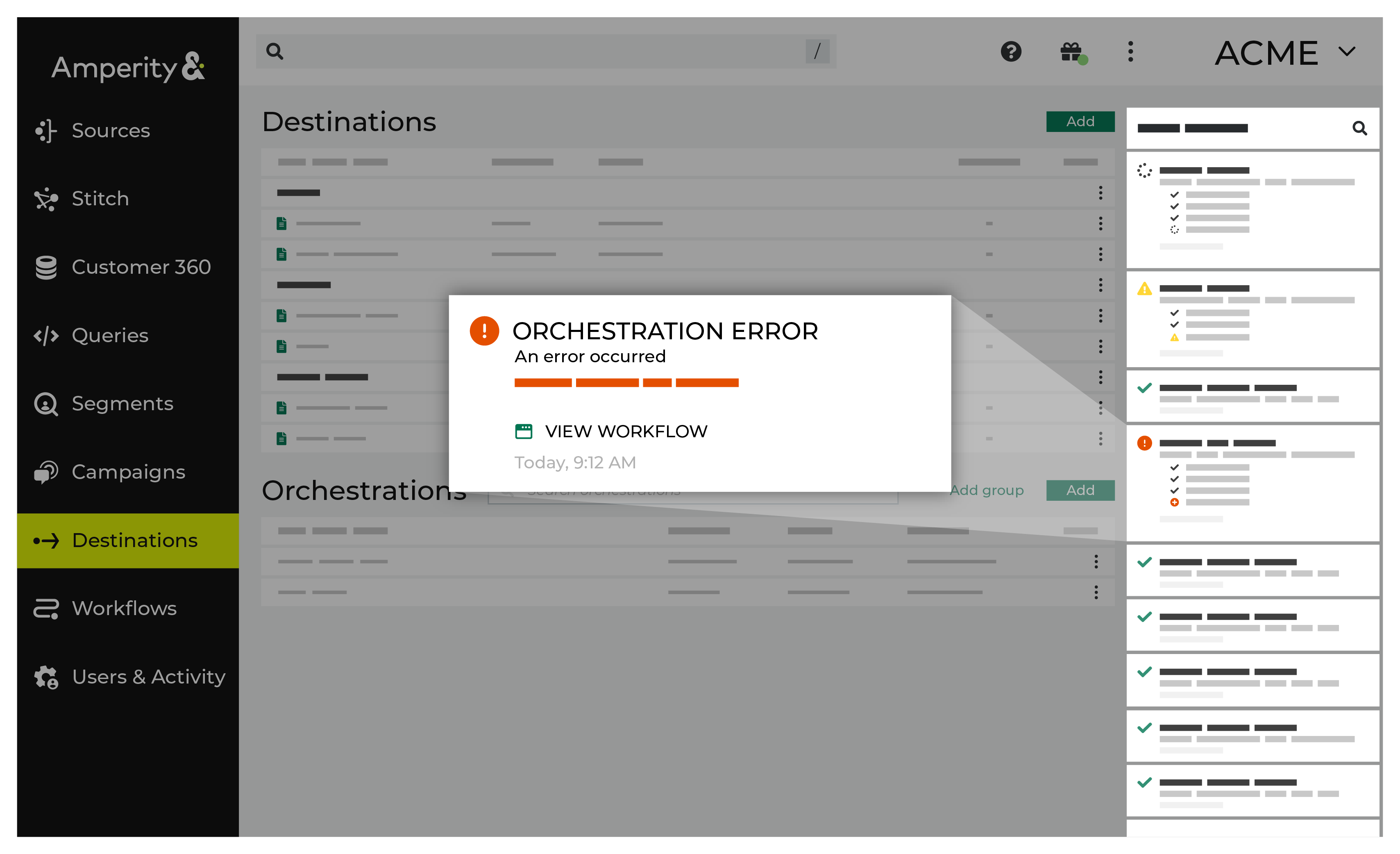
If you receive a notification error, review the details, and then click the Workflow job link to open this notification error in the Workflows page. |
|
|
On the Workflows page, review the individual steps to determine which steps have errors that require your attention, and then click Show Resolutions to review the list of workflow actions generated for this error. 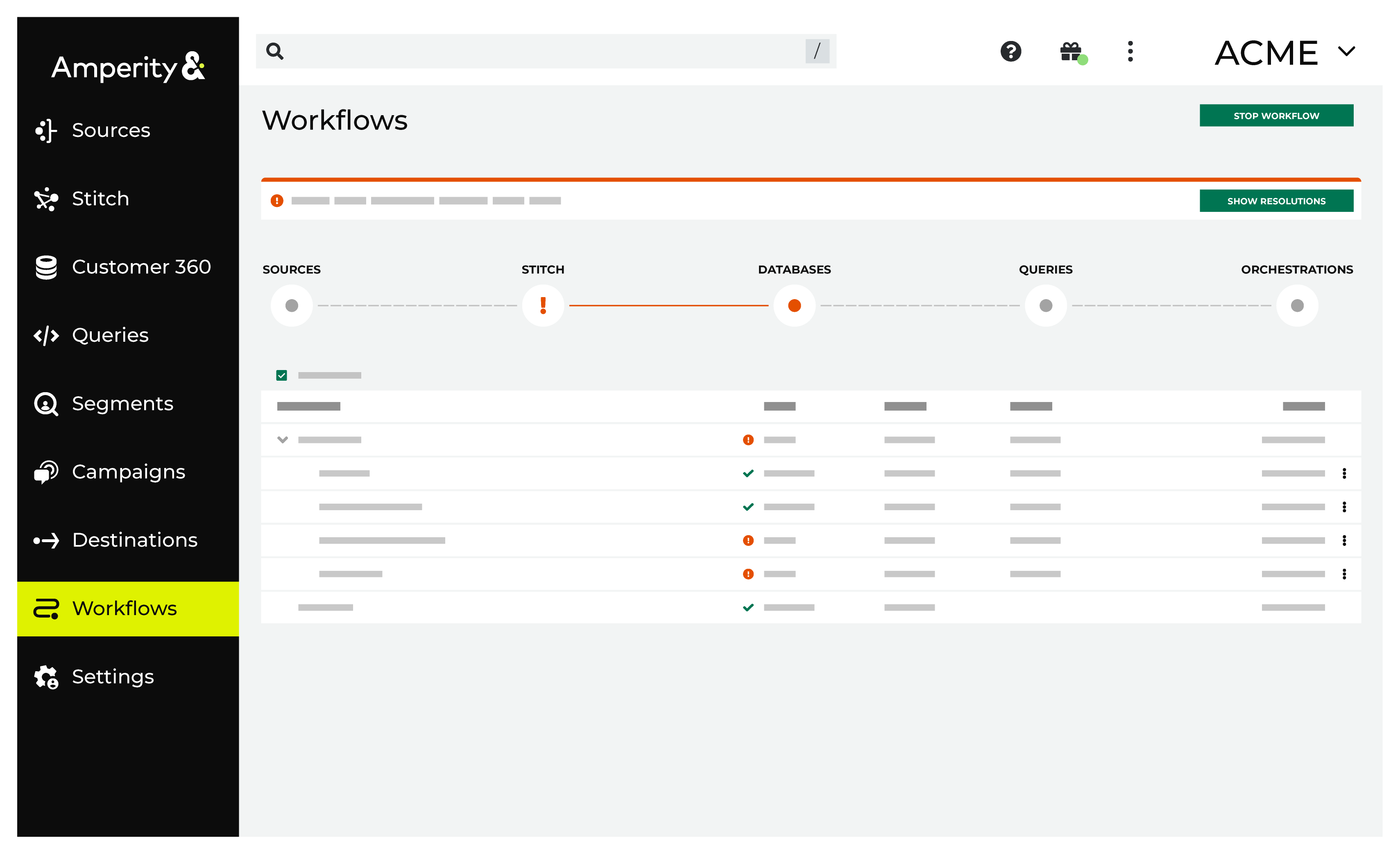
|
|
|
A list of individual workflow actions are shown. Review the list to identify which action you should take. Some workflow actions are common across workflows and will often be available, such as retrying a specific task within a workflow or restarting a workflow. These types of actions can often resolve an error. In certain cases, actions are specific and are shown when certain conditions exist in your tenant. These types of actions typically must be resolved and may require steps that must be done upstream or downstream from your Amperity workflow. Amperity provides a series of workflow actions that can help resolve specific issues that may arise with Pinterest Ads Manager, including: |
|
|
Select a workflow action from the list of actions, and then review the steps for resolving that error. After you have completed the steps in the workflow action, click Continue to rerun the workflow. |
Invalid credentials
The credentials that are defined in Amperity are invalid.
To resolve this error, verify that the credentials required by this workflow are valid.
Open the Credentials page.
Review the details for the credentials used with this workflow. Update the credentials for Pinterest Ads Manager if required.
Return to the workflow action, and then click Resolve to retry this workflow.
Invalid settings
The configuration for this workflow has a setting that Pinterest Ads Manager was unable to accept. This can occur when the conversion access token, ad account ID, or conversion tag ID does not match the values configured in Pinterest Ads Manager.
To resolve this error, verify the settings configured for this workflow in Amperity.
Open the Destinations page and review the settings for the Pinterest Ads Manager destination associated with this workflow. Verify that the conversion access token, ad account ID, and conversion tag ID are correct.
Return to the workflow action, and then click Resolve to retry this workflow.