
 Operators Guide



About compute
Amperity runs data processing workloads – such as Stitch, customer profile (database) generation, customer attribute (CDT) builds, queries, and segmentation – on compute resources. By default, these workloads run on compute that is managed by Amperity.
Bring Your Own Compute (BYOC) allows your brand to run Amperity workloads on a data platform that is owned and managed by your brand, such as Databricks. Compute runs within your brand’s account, against data that is stored in your brand’s storage location, while Amperity continues to manage the control plane: the user interface, workflow orchestration, and managed connectors.
Note
BYOC and Bring Your Own Storage (BYOS) are independent – you can enable either one on its own. Brands that use both keep the storage and the processing of their data within infrastructure that they own and manage.
For more information about connections between Amperity and other data storage and compute environments, see Amperity Bridge.
What runs on your compute
When BYOC is enabled for Databricks, the following workloads run on your brand’s Databricks account:
Source transformations – customer attributes (CDTs) – and domain tables
Stitch, which runs on an on-demand Spark cluster
Customer profile (database) generation
Queries and segments, including the audiences that power campaigns and journeys
The following capabilities continue to run on Amperity-managed compute:
Campaign and journey delivery (sending the computed audience to destinations) and workflow orchestration
Bridge and data ingest
Real-time profiles and the Profile API
Predictive models, AmpIQ, and the AI Assistant
Control-plane operations: the user interface, monitoring, and managed connectors
Note
Each workload runs against a single compute provider and a single SQL dialect; splitting one workload across providers is not supported. During the current public preview period, workloads are enabled in stages – Stitch is enabled separately from the other supported workloads – so a tenant may run some workloads on your Databricks account and the rest on Amperity-managed compute. Amperity confirms which workloads are enabled for your tenant.
Run Amperity workloads on your own Databricks
Note
Running Amperity workloads on Databricks is in public preview. Functionality is added in phases, and BYOC is enabled for your tenant by Amperity.
Configure a tenant to run Amperity workloads on a Databricks workspace that is owned and managed by your brand. Amperity connects to your workspace using a service principal, provisions the Unity Catalog objects that it needs, and runs compute against data in your storage location.
Amperity does not require unmanaged access to your infrastructure. You provision or approve the workspace; Amperity is granted only the permissions it needs to orchestrate supported workloads; jobs are initiated from Amperity and execute in your workspace; and results, metadata, and logs flow back to Amperity for monitoring and support.
Account prerequisites
Before you connect Amperity to your Databricks workspace, verify the following.
Prerequisite |
Description |
|---|---|
Storage |
BYOC works with either Amperity-managed storage or Bring Your Own Storage. Databricks is where compute happens; the source and destination for business data remain in the configured storage location. Brands that need both data residency and compute governance use Bring Your Own Storage and BYOC together. |
Unity Catalog |
Your workspace must be enabled for Unity Catalog . Amperity creates a catalog for its workloads and does not require a default (managed) storage location to be set on the metastore. |
Account administrator |
The person who completes the integration must be a Databricks account administrator (not only a workspace administrator). Account-administrator access is required to read the account ID, create a service principal, and generate access tokens. |
Region |
Your Databricks workspace and your Amperity storage location should be in the same cloud region. Running compute and storage in different regions causes slower jobs, additional networking charges, and harder troubleshooting. |
Network capacity |
The workspace network must have enough available IP addresses for Stitch to start on-demand Spark clusters. Databricks assigns two IP addresses per node, so size the subnet for the largest cluster a Stitch run will use. |
Important
BYOC is enabled by Amperity for your tenant. If the Databricks compute section does not appear under Settings > Integrations, contact Amperity Support to enable it.
Configure ANSI mode
Databricks SQL warehouses run with an ANSI mode
setting that changes how SQL resolves data types. For example, COALESCE(<integer>, <string>) returns a string when ANSI mode is off, but coerces numerically – or raises an error – when ANSI mode is on.
Amperity expects ANSI mode to be off so that type resolution matches how Amperity analyzes and builds SQL. For Databricks accounts created on or after October 19, 2022, ANSI mode is on by default, so this setting must be changed deliberately during onboarding.
Set ANSI mode at the workspace level so that it applies to every SQL warehouse in the workspace, including the warehouse Amperity provisions. A session-level SET statement applies only to the session that runs it and does not carry over to the connections Amperity opens.
Check the current value from the Databricks SQL editor:
SET ANSI_MODE;If ANSI mode is on, sign in to your Databricks workspace as a workspace administrator, click your username in the top bar, and select Settings.
Click Compute, then click Manage next to SQL warehouses and serverless compute.
In the SQL Configuration Parameters box, add the following on its own line, then save:
ANSI_MODE falseEach parameter is a name and a value separated by a space, one per line. Saving restarts any running SQL warehouse in the workspace.
Run
SET ANSI_MODE;again to confirm that it now reportsfalse.
Warning
Changing ANSI mode after onboarding can change the results of existing queries and customer attributes. Review the Databricks ANSI mode documentation before adjusting this setting.
Integration steps
Amperity provisions all of the Databricks resources that it needs automatically. You provide a small number of connection details, and Amperity creates the service principal, storage credentials, external locations, catalog, volumes, cluster policy, and SQL warehouse for you.
To connect Amperity to your Databricks workspace

|
Gather workspace details Sign in to your Databricks account as an account administrator and collect the following values.
|
|
Generate access tokens Amperity needs a short-lived account access token and a workspace access token to complete provisioning. Generate them using the Databricks CLI .
Important OAuth tokens are valid for one hour. If provisioning fails with an authorization error, the token may have expired. Generate fresh tokens and try again. |
|
Add the workspace in Amperity
|
|
Wait for provisioning to finish Amperity provisions resources in your workspace and reports the current step and status as it works. Provisioning creates:
Provisioning takes a few minutes. Leave the page open until it reports that it is complete. |
|
Run workloads on Databricks After provisioning completes, configure Amperity to run workloads on the connected workspace.
|
Re-sync a workspace
Use Sync to re-apply the provisioning pipeline to a connected workspace – for example, after an Amperity update adds a new Unity Catalog resource or grant. Syncing:
Provisions any new Unity Catalog resources
Re-applies grants for the existing service principal
Keeps the existing service principal and does not rotate its credentials
To sync, open the actions menu on the workspace row under Settings > Integrations > Databricks compute, click Sync, and provide a current Workspace access token (and, on Azure, the optional Azure access connector ID, in the form /subscriptions/.../accessConnectors/..., when the workspace uses an Azure managed identity for storage access).
To rotate the service principal’s credentials, remove the workspace with Delete and add it again; syncing does not rotate them.
Security and access
BYOC follows a least-privilege model and a shared responsibility model.
Amperity is responsible for |
Your brand is responsible for |
|---|---|
|
|
Note
Activation and downstream delivery run on Amperity-managed compute, not on your Databricks account. Confirm the boundaries of what runs where with your Amperity representative.
Scoped service principal. Amperity creates a dedicated service principal per tenant. It is granted access only to the catalog, schemas, external locations, and volumes that Amperity provisions for that tenant. It has no access to other catalogs or data in your workspace.
Scoped storage credentials. Storage credentials are scoped to your tenant’s storage location. The service principal cannot reach storage outside the locations Amperity provisions, and Amperity build artifacts are mounted read-only.
Credential management. The service principal’s OAuth secret is stored by Amperity in a secrets manager and is never returned after creation. Syncing a workspace does not rotate the credential. Review the Databricks recommendations for service principals and tokens , including token lifetimes and IP access lists.
Audit logging. Activity is logged in both systems. Activity logs in Amperity records user actions and workflow history; Databricks records account and workspace audit events for activity performed by the service principal.
Do not embed secrets in configuration. Do not place encryption keys, credentials, or other secrets in customer-attribute (CDT) definitions or query text, where they can appear in logs. Reference secrets by credential instead.
Manual provisioning
Amperity provisions the Databricks resources described here automatically during integration. To provision them by hand, or to review exactly what Amperity creates, see Manual provisioning.
Debugging steps
Symptom |
Resolution |
|---|---|
The Databricks compute section does not appear under Settings > Integrations. |
BYOC is not yet enabled for your tenant. Contact Amperity Support . |
Provisioning fails with an authorization or access-denied error. |
The account or workspace access token expired. OAuth tokens last one hour – generate fresh tokens (Step 2) and try again. |
Provisioning fails while creating the catalog, with a cloud-storage “forbidden” or invalid-credential-trust-policy error. |
The IAM role trust policy that grants Databricks access to your storage is still propagating. Amperity retries automatically; if the error persists, re-run provisioning after a few minutes. |
A Databricks workload fails and Amperity shows a generic “Workload failed, see run output for details” message. |
The detailed error is written to the Databricks run output. Open the corresponding run in your Databricks workspace – the Stitch run name has the form |
A customer profile (database) build fails with an error that a multipart table is not supported. |
Customer profile generation on Databricks does not accept multipart input tables, such as a campaign recipient table (CRT). The error names the table; remove it from the database or contact Amperity Support . |
A Stitch job fails partway through with an S3 |
This usually indicates a storage-credential propagation or token-expiry issue. Re-sync the workspace and re-run the job. |
Stitch fails to start with an “insufficient free addresses in subnet” error. |
The workspace network does not have enough available IP addresses for the Spark cluster. Work with your cloud or Databricks administrator to add or migrate to a larger subnet or approved network configuration, then re-run. |
FAQ
For Bring Your Own Compute, what runs where?
BYOC lets your brand run supported batch data jobs in your own approved environment, such as Databricks. Amperity continues to manage the application experience, workflow orchestration, real-time services, and activation workflows.
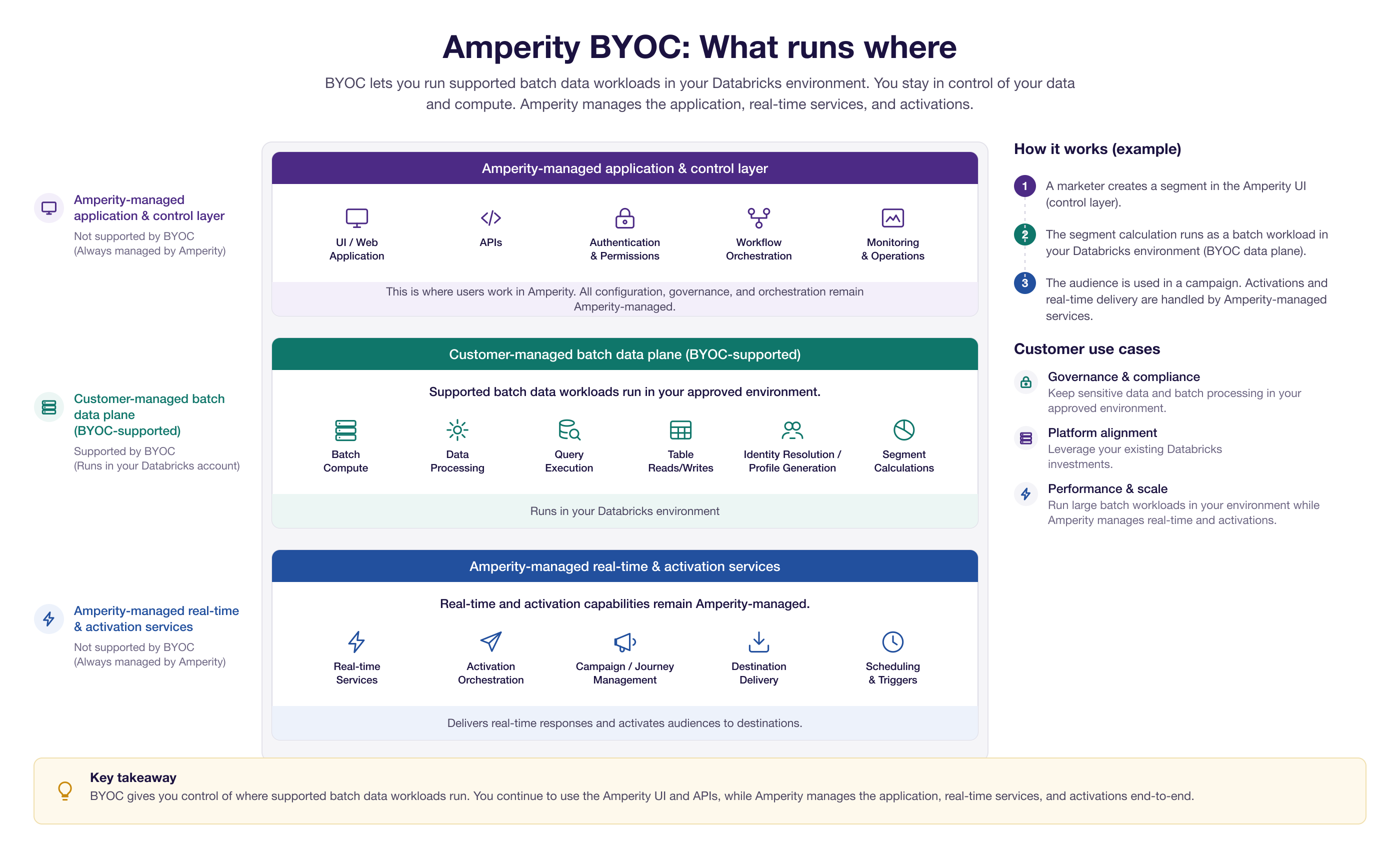
In short:
Your environment runs supported batch data processing.
Amperity runs the application and service layers.
Under BYOC, the following supported batch data jobs run in your approved environment:
Batch compute
Data processing
Queries
Table reads and writes
Stitch
Customer profile (database) generation
Segments
What is the batch data plane?
The batch data plane is the part of the system that performs supported batch data work in your approved environment – the part that BYOC supports. It covers the supported batch data jobs listed under what runs where.
What is the application and control layer?
The application and control layer is the part of Amperity that users interact with and that coordinates the overall product experience. It remains Amperity-managed and includes:
User interface
APIs
Authentication and permissions
Workflow orchestration
Monitoring and operations
What are real-time and activation services?
Real-time and activation services are Amperity-managed services that support downstream customer engagement and delivery. They are not part of the BYOC-supported batch data plane, and include:
Real-time profiles
Activation
Campaigns and journeys
Destination delivery
Scheduling and triggers
Does Bring Your Own Compute move the Amperity application into my cloud?
No. BYOC does not move the full Amperity application stack into your environment. The application and control layer and the real-time and activation services remain Amperity-managed. BYOC moves only supported batch data jobs into your approved environment.
Does Bring Your Own Compute support real-time and activations?
No – not as part of the BYOC-supported batch data plane. Real-time and activation services remain Amperity-managed. Segmentation can run in BYOC, but campaigns, activations, and real-time delivery still run through Amperity-managed services.
How does this work in practice?
Consider a segment that is used in a campaign:
A marketer creates a segment in the Amperity UI.
The underlying segment calculation runs in your BYOC environment.
The segment is then used by Amperity-managed campaign, activation, or real-time services.
You create the audience in Amperity, the batch data work can run in your environment, and Amperity manages the downstream activation experience.