
 Operators Guide



Configure offline conversion events for Snapchat
The Snapchat Conversions API lets your brand send offline conversion events — such as in-store purchases — to Snapchat. Snapchat uses these events to attribute conversions that happen away from your website to your campaigns, and to optimize campaigns against them.
Send offline conversion events to Snapchat to attribute in-store and other offline purchases to your Snapchat campaigns, and to optimize those campaigns against conversions that happen away from your website. Each row returned by your query is sent as one offline event, except PURCHASE rows that share an order_id, which are combined into one event. Each event carries an event type, an event timestamp, and one or more customer identifiers.
Amperity hashes customer identifiers with SHA-256 before sending them. The one exception is the mobile advertising ID (madid), which Snapchat requires unhashed; Amperity lowercases it and sends it as is. See the Snapchat Conversions API reference for more information.
Caution
The values for email, phone, fn, ln, ge, ct, st, zp, country, and external_id sent to Snapchat are SHA-256 hashed automatically by Amperity before sending. Do not use the TO_HEX() function with the email, phone, fn, ln, ge, ct, st, zp, country, and external_id fields for queries that return results for Snapchat.
Get details
Review the following details before configuring credentials for Snapchat and before configuring Amperity to send offline conversion events to Snapchat.

|
Credential settings Access Token
Pixel ID
|
|
|
Snapchat settings Default Event Name
Default Currency
Event Tag
Note Default Event Name, Default Currency, and Event Tag are set on the destination and apply to every orchestration that uses it. They cannot be overridden by an individual orchestration. Add a separate destination for each combination you need, such as one that tags in-store conversions and another that tags call-center conversions. |
|
|
Request properties
|
Configure credentials
Configure credentials for Snapchat before adding a destination.
An individual with access to Snapchat should use SnapPass to securely share “Access Token” and “Pixel ID” details with the individual who configures Amperity.
To configure credentials for Snapchat Offline Events

|
From the Settings page, select the Credentials tab, and then click the Add credential button. |
|
In the Credentials settings dialog box, do the following: From the Plugin dropdown, select Snapchat Offline Events. Note Amperity provides two Snapchat connectors. Select Snapchat Offline Events to send offline conversion events to the Snapchat Conversions API. Snapchat is a separate connector that sends audiences for ad targeting. Assign the credential a name and description that ensures other users of Amperity can recognize when to use this destination. |
|
The settings that are available for a credential vary by credential type. For the “snapchat-offline-events” credential type, configure settings, and then click Save. Access Token
Pixel ID
|
Add destination
Use a sandbox to configure a destination for Snapchat. Before promoting your changes, send a sample audience, and then verify the results in Snapchat. After verifying the end-to-end workflow, push the destination from the sandbox to production.
To add a destination
|
|
Open the Destinations tab to configure a destination for Snapchat. Click the Add Destination button to open the Destination dialog box. Enter the name of the destination and a description. For example: “Snapchat offline events” and “Send offline conversion events to Snapchat.”. |
|
|
Credentials allow Amperity to connect to Snapchat. The credential type is set automatically. You may use an existing credential or you may add a new one. Select an existing credential from the Credential dropdown. – or – Select Create a new credential from the Credential dropdown. This opens the Credential dialog box. |
|
|
In the “Destination settings” dialog box, assign the destination a name and description that ensures other users of Amperity can recognize when to use this destination. Configure business user access By default a destination is available to all users who have permission to view personally identifiable information (PII). Enable the Admin only checkbox to restrict access to only users assigned to the Datagrid Operator and Datagrid Administrator policies. Enable the PII setting checkbox to allow limited access to PII for this destination. Use the Restrict PII access policy option to prevent users from viewing data marked as PII anywhere in Amperity and from sending data to downstream workflows. |

|
Configure the following settings, and then click “Save”. Default Event Name
Default Currency
Event Tag
Note Default Event Name, Default Currency, and Event Tag are set on the destination and apply to every orchestration that uses it. They cannot be overridden by an individual orchestration. Add a separate destination for each combination you need, such as one that tags in-store conversions and another that tags call-center conversions. |

|
After configuring this destination users may use orchestrations to send query results Snapchat. |

|
Validate the audience with Snapchat by using a sample audience with a very small membership. For example: 10 or 100 members or the minimum audience size recommended by Snapchat. Send the sample audience to Snapchat and verify the sample audience is correct in Snapchat. Make adjustments if necessary. Only send full audiences after validation is complete. |
Build a query
Use a query to build a combination of data — typically from the Merged Customers and Unified Itemized Transactions tables — that returns offline conversion events to send to Snapchat. Each row must include an event timestamp and at least one customer identifier. Adding identity columns such as name, city, state, and postal code can improve the match rate, and event attributes such as conversion value, currency, and order ID are sent with each event.
Review the Conversions API parameters section for the columns your query must and may return, and the Supported event types section for the allowed event_name values.
Important
Amperity adds the following parameters and applies values automatically:
action_source is automatically set to OFFLINE
event_id is an automatically generated SHA-256 hash of event_name, event_time, and the customer identifier, unless the query returns an event_id column. For a combined purchase event, the order_id is used instead
event_tag is applied from the Event Tag setting, when one is configured
Bound the query to recent events so each orchestration sends new conversions instead of re-sending the full transaction history; choose a window that matches how often the orchestration runs. Snapchat does not attribute events that are more than 28 days old, and Amperity does not send them.
You can return one row per order, or one row per line item and let Amperity combine them. Both produce the same value for an order.
Order-level events
A query that returns one row per order aggregates the line items itself. A query that returns a collection of recent in-store purchase events for use in Snapchat is similar to:
 1SELECT
 2  LOWER(TRIM(mc.email))                                 AS email       -- mc.email
 3  ,uit.order_id                                         AS order_id    -- uit.order_id
 4  ,uit.order_id                                         AS event_id    -- uit.order_id, a stable deduplication key
 5  ,CAST(SUM(uit.item_revenue) AS DECIMAL(18,2))         AS value       -- uit.item_revenue is a line total, so SUM is the order total
 6  ,'USD'                                                AS currency
 7  ,CAST(TO_UNIXTIME(MAX(uit.order_datetime)) AS BIGINT) AS event_time  -- uit.order_datetime, as Unix seconds
 8  ,'PURCHASE'                                           AS event_name
 9FROM Merged_Customers mc
10JOIN Unified_Itemized_Transactions uit ON mc.amperity_id = uit.amperity_id
11WHERE mc.email IS NOT NULL
12  AND uit.purchase_channel = 'STORE'
13  AND uit.order_datetime >= CURRENT_DATE - INTERVAL '2' day
14  AND COALESCE(uit.is_return, false) = false
15  AND COALESCE(uit.is_cancellation, false) = false
16  AND uit.item_quantity > 0
17  AND uit.item_revenue > 0
18GROUP BY 1, 2
Note
The values in purchase_channel vary by tenant. Review the values in your own Unified Itemized Transactions table to identify the ones that represent offline purchases.
Caution
Use COALESCE when filtering is_return and is_cancellation. Both columns are null when the status is unknown, and a bare is_return = false comparison drops those rows instead of keeping them.
Line-item events
A query that returns one row per line item omits the aggregation. Amperity combines the rows that share an order_id into a single event, sums value across them, and sends each row’s value as an item entry with the event:
 1SELECT
 2  LOWER(TRIM(mc.email))                            AS email       -- mc.email
 3  ,uit.order_id                                    AS order_id    -- uit.order_id
 4  ,CAST(uit.item_revenue AS DECIMAL(18,2))         AS value       -- uit.item_revenue, the total for this line item
 5  ,'USD'                                           AS currency
 6  ,CAST(TO_UNIXTIME(uit.order_datetime) AS BIGINT) AS event_time  -- uit.order_datetime, as Unix seconds
 7  ,'PURCHASE'                                      AS event_name
 8FROM Merged_Customers mc
 9JOIN Unified_Itemized_Transactions uit ON mc.amperity_id = uit.amperity_id
10WHERE mc.email IS NOT NULL
11  AND uit.purchase_channel = 'STORE'
12  AND uit.order_datetime >= CURRENT_DATE - INTERVAL '2' day
13  AND COALESCE(uit.is_return, false) = false
14  AND COALESCE(uit.is_cancellation, false) = false
15  AND uit.item_quantity > 0
16  AND uit.item_revenue > 0
Important
Return either one row per order or one row per line item, not both. Returning a pre-aggregated order total alongside the line items for the same order reports that order’s revenue more than once.
How purchase events are grouped
When a query returns both an event_name and an order_id column, Amperity combines PURCHASE rows that share an order_id into a single event before sending it to Snapchat. This lets a query return one row per line item without reporting one conversion per item.
For a combined event:
value is the sum of value across the grouped rows.
event_time is the earliest event_time among them.
currency is taken from one of the grouped rows, so return the same currency for every row of an order.
Each grouped row’s value is sent as one entry in the event’s item contents. Because value is a line total, each entry is the line total rather than a unit price. No quantity or product ID is sent.
Customer identifiers are taken from one of the grouped rows, not combined. Return the same identifiers on every row of an order. If the row used has no usable identifier, the order is not sent and is reported as “PURCHASE event stale or missing identifier”.
event_id is the order_id when event_id is not mapped.
Rows are sent one event per row when any of the following is true:
The query does not return both event_name and order_id.
The event is not a PURCHASE.
The row is a PURCHASE with an empty order_id.
The row’s event_name is empty and the event type comes from the Default Event Name setting, even when that setting is PURCHASE.
Deduplication and query lookback
Snapchat deduplicates events by event_id, but only for a limited time after it first receives an event:
A PURCHASE event that carries an order_id is deduplicated for 30 days.
ADD_CART and PAGE_VIEW events are deduplicated for only 1 second.
Every other event is deduplicated for 48 hours.
Amperity keeps no record of which events it has already sent, so an orchestration that re-reads the same rows sends them again. Snapchat discards the repeats while the window is open and counts them as new conversions once it has closed.
This matters when runs overlap — when a query looks back further than the time between orchestration runs. A query with a seven-day lookback that runs daily sends each event in seven consecutive runs. For most events, every send after the first 48 hours is counted again. For ADD_CART and PAGE_VIEW, every send after the first is counted again.
To avoid double counting, keep the query lookback shorter than the deduplication window that applies to the events you send, or schedule runs so they do not overlap. For ADD_CART and PAGE_VIEW, the window is too short to rely on, so make sure no two runs return the same event.
Note
When the events in a run span more than 48 hours, Amperity reports a warning on the orchestration naming the span. PURCHASE events that carry an order_id are excluded from that span, because Snapchat deduplicates them for 30 days. The warning does not account for the 1-second window that applies to ADD_CART and PAGE_VIEW, so overlapping runs that send those events can double count without a warning.
Supported event types
event_name must match one of the values below. Matching is case-insensitive, so purchase and PURCHASE are both accepted and are sent as PURCHASE.
A query does not have to return event_name. When it is not returned, every row is sent using the Default Event Name setting. A row whose event_name is empty or unrecognized is also sent using the Default Event Name setting, so a misspelled value is sent as the default event type rather than reported. When there is no usable event_name and no Default Event Name is configured, the row is not sent and is reported as failed.
Supported event_name values (31)
ACHIEVEMENT_UNLOCKED, AD_CLICK, AD_VIEW, ADD_BILLING, ADD_CART, ADD_TO_WISHLIST, APP_INSTALL, APP_OPEN, COMPLETE_TUTORIAL, CUSTOM_EVENT_1, CUSTOM_EVENT_2, CUSTOM_EVENT_3, CUSTOM_EVENT_4, CUSTOM_EVENT_5, INVITE, LEVEL_COMPLETE, LIST_VIEW, LOGIN, PAGE_VIEW, PURCHASE, RATE, RESERVE, SAVE, SEARCH, SHARE, SIGN_UP, SPENT_CREDITS, START_CHECKOUT, START_TRIAL, SUBSCRIBE, VIEW_CONTENT
Data validation
Amperity validates the columns your query returns before the orchestration runs, and then validates each row before sending it.
Before the run starts
The orchestration fails and no events are sent when:
event_time is not returned by the query. The workflow reports “event_time must be selected as a Destination Attribute.”
event_time is not an integer column. Convert a date or datetime column to Unix seconds, for example with
CAST(TO_UNIXTIME(uit.order_datetime) AS BIGINT).None of email, phone, or madid is returned by the query.
email, phone, or event_name is returned as something other than a string column.
For each row
Amperity drops rows that Snapchat would reject, so that one invalid row does not cause an entire batch of events to be rejected. Dropped rows are reported as failed with the reason. A row is dropped when:
event_time is empty.
The event is more than 28 days old. Snapchat attributes offline events within a 28-day window and cannot attribute events outside it.
event_name is empty or unrecognized and no Default Event Name is configured.
None of email, phone, or madid holds a usable value. A phone number that cannot be parsed does not count as a usable identifier.
Optional identity columns that cannot be used — such as an unrecognized ge value — are dropped from that row individually and the rest of the event is still sent.
After the events are sent
Snapchat validates the events it receives. When it rejects part of a batch, the rejected events are reported as failed and the rest of the batch is sent. When it rejects an entire batch, every event in that batch is reported as failed with the reason Snapchat returned.
Caution
When more than 90 percent of the events in the first five batches are rejected, the orchestration stops and reports an error. This indicates that a column is mapped incorrectly rather than that individual rows are bad. Review the email, phone, and event_name values returned by your query. A batch holds up to 2,000 events, so a run that sends fewer than five batches is not checked.
Conversions API parameters
The following table describes each column Amperity sends to Snapchat. A query must return columns with the same name as listed in the “Amperity name” column; Amperity maps them to the Snapchat field names automatically. Return the column names in lowercase, exactly as listed in the “Amperity name” column.
Important
A query must return event_time, along with at least one of email, phone, or madid. All other columns are optional. Snapchat requires value and currency for PURCHASE events; currency can come from the Default Currency setting instead of the query.
Amperity name |
Snapchat field |
Source column |
Description |
|---|---|---|---|
event_time |
event_time |
order_datetime |
Required When the event occurred, as a Unix timestamp in seconds. The column must be an integer; convert a datetime column with |
em |
Required, unless phone or madid is returned. An email address. Amperity trims and lowercases the value and applies SHA-256 hashing before sending. Return the raw address. |
||
phone |
ph |
phone |
Required, unless email or madid is returned. A phone number. Amperity normalizes the number to E.164, removes the leading +, and applies SHA-256 hashing before sending. A number without a country code is treated as a US number, so include the country code for numbers outside the US. A number that cannot be parsed is dropped. |
madid |
madid |
— |
Required, unless email or phone is returned. A mobile advertising ID (IDFA on iOS, GAID on Android). Amperity trims and lowercases the value and sends it unhashed, as Snapchat requires. Return the raw ID; do not hash it. |
event_name |
event_name |
— |
Optional The type of conversion event, such as |
value |
value |
item_revenue |
Optional. Snapchat requires it for PURCHASE events. The monetary value of the event. This is a total, not a per-unit price: return the total for the order, or the total for the line item and let Amperity sum them. Do not return a per-unit price. |
currency |
currency |
— |
Optional. Snapchat requires it for PURCHASE events. The currency for value, as a three-character ISO 4217 code such as Note The currency column in Unified Itemized Transactions holds descriptive values such as “dollar” rather than ISO 4217 codes. Return a literal code, or map your values to codes in the query. |
order_id |
order_id |
order_id |
Optional The order identifier. When the query also returns event_name, PURCHASE rows sharing an order_id are combined into one event (see How purchase events are grouped). |
event_id |
event_id |
order_id |
Optional A unique identifier Snapchat uses to deduplicate events. Return a stable value such as the order ID so that repeated sends of the same event are not counted twice. When the query does not return it, Amperity generates one from the event name, event time, and identifier; for a combined purchase event, the order_id is used. |
fn |
fn |
given_name |
Optional A first name. Amperity lowercases the value, removes punctuation, and applies SHA-256 hashing before sending. |
ln |
ln |
surname |
Optional A last name. Amperity lowercases the value, removes punctuation, and applies SHA-256 hashing before sending. |
ge |
ge |
gender |
Optional A gender identifier. Amperity accepts |
ct |
ct |
city |
Optional A city. Amperity lowercases the value, removes spaces and punctuation, and applies SHA-256 hashing before sending. |
st |
st |
state |
Optional A state. Amperity normalizes a full state name to its two-letter code and applies SHA-256 hashing before sending. |
zp |
zp |
postal |
Optional A postal code. Amperity removes spaces and hyphens, shortens a value of six or more digits to its first five, and applies SHA-256 hashing before sending. |
country |
country |
country |
Optional A country. Amperity normalizes a full country name to its two-letter ISO code and applies SHA-256 hashing before sending. |
external_id |
external_id |
loyalty_id |
Optional Your own identifier for the customer, such as a loyalty ID. Amperity applies SHA-256 hashing before sending. |
Note
fn, ln, ge, ct, st, zp, country, and external_id are sent when your query returns them, but they are not checked before the orchestration runs. A misspelled column name for one of these is not reported as an error; the column is simply not sent. Return each of them as a string column: a numeric column, such as ge returned as 1 or 2, causes the orchestration to fail.
Workflow actions
A workflow will occasionally show an error that describes what prevented a workflow from completing successfully. These first appear as alerts in the notifications pane. The alert describes the error, and then links to the Workflows tab.
Open the Workflows page to review a list of workflow actions, choose an action to resolve the workflow error, and then follow the steps that are shown.
|
|
You may receive a notifications error for a configured Snapchat destination. This appears as an alert in the notifications pane on the Destinations tab. 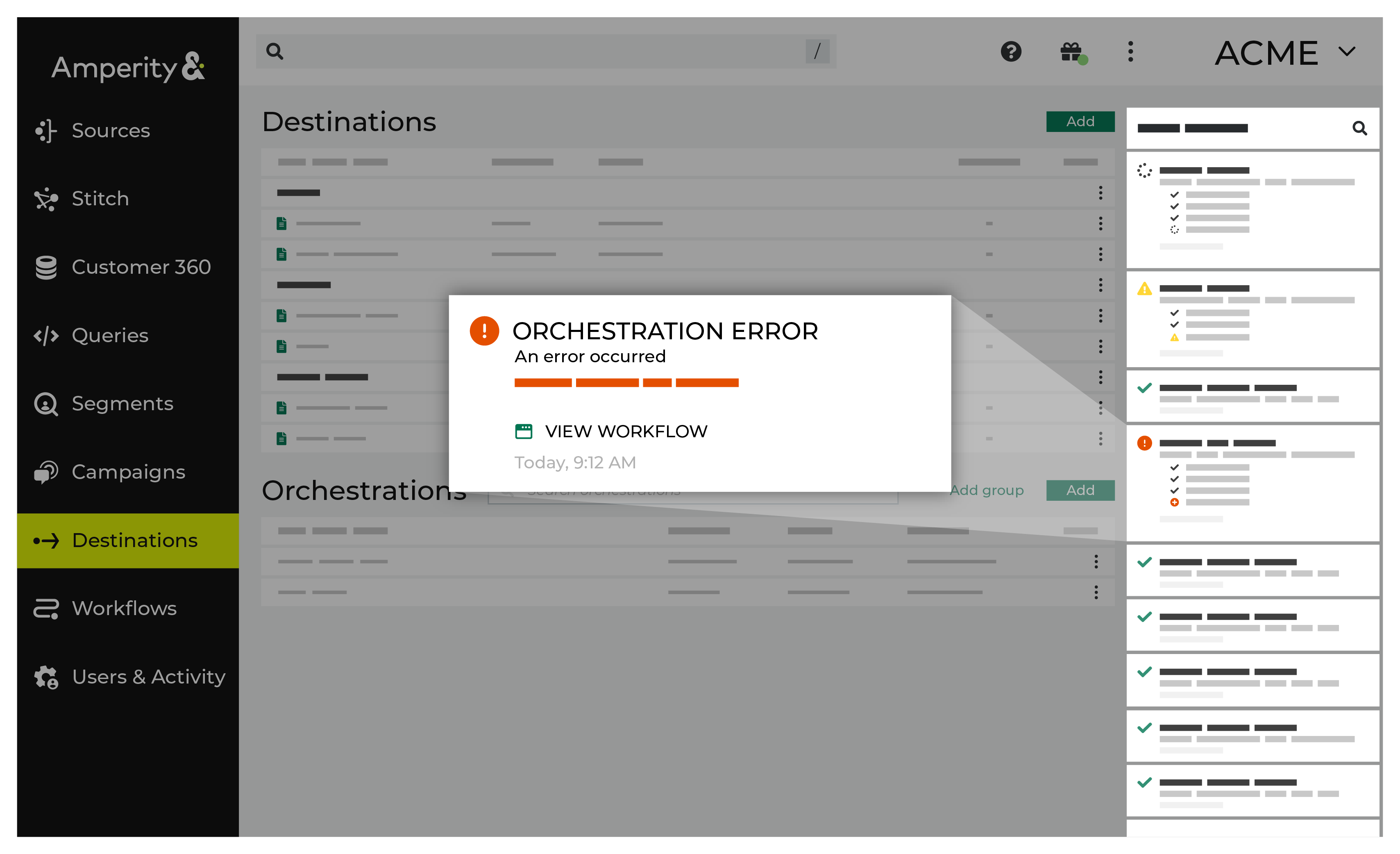
If you receive a notification error, review the details, and then click the Workflow job link to open this notification error in the Workflows page. |
|
|
On the Workflows page, review the individual steps to determine which steps have errors that require your attention, and then click Show Resolutions to review the list of workflow actions generated for this error. 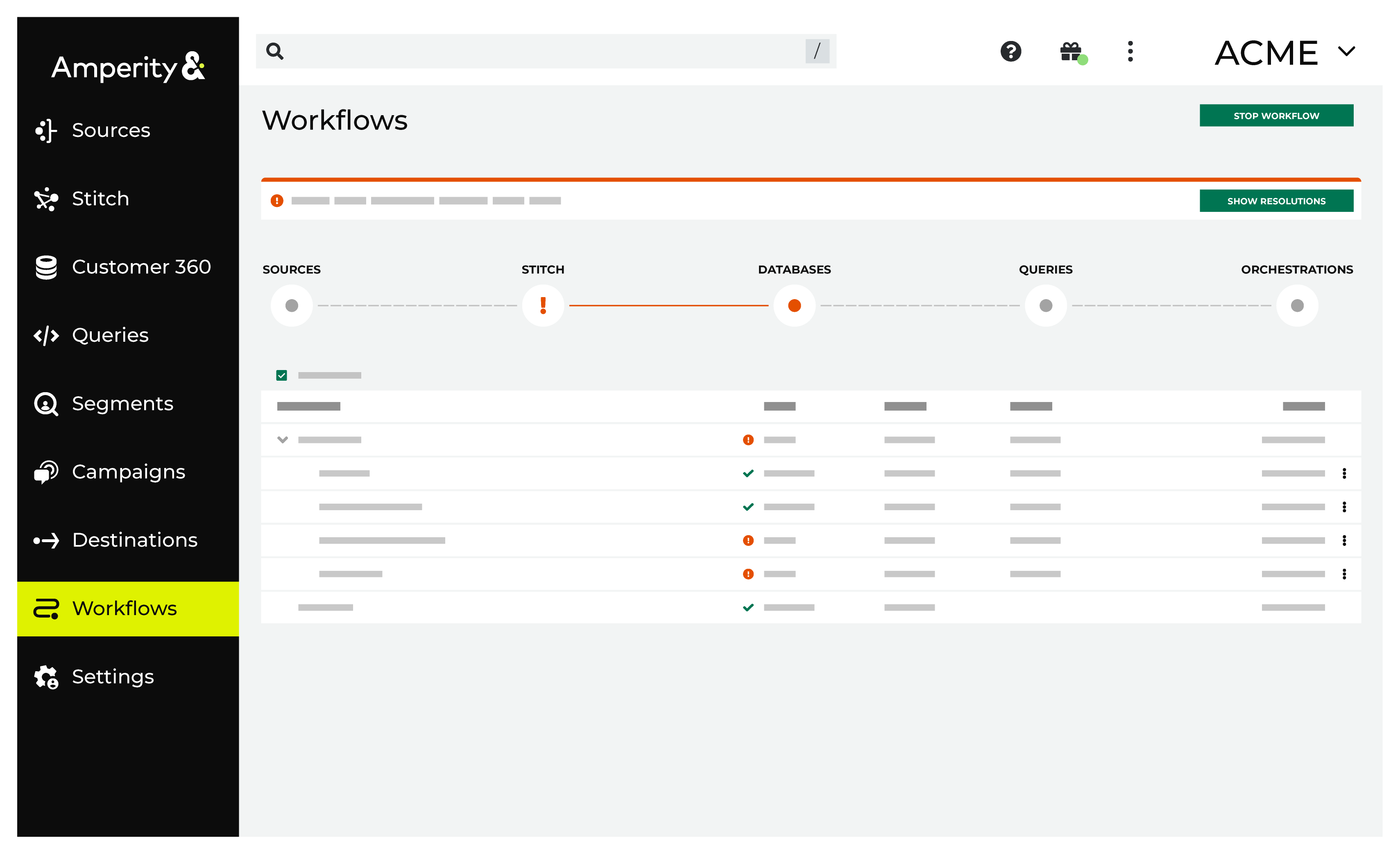
|
|
|
A list of individual workflow actions are shown. Review the list to identify which action you should take. Some workflow actions are common across workflows and will often be available, such as retrying a specific task within a workflow or restarting a workflow. These types of actions can often resolve an error. In certain cases, actions are specific and are shown when certain conditions exist in your tenant. These types of actions typically must be resolved and may require steps that must be done upstream or downstream from your Amperity workflow. Amperity provides a series of workflow actions that can help resolve specific issues that may arise with Snapchat, including: |
|
|
Select a workflow action from the list of actions, and then review the steps for resolving that error. After you have completed the steps in the workflow action, click Continue to rerun the workflow. |
Note
If Snapchat rejects an entire batch of events, the workflow reports the error with the detail Snapchat returned — review the event field values returned by your query. If a send is rate limited or Snapchat returns a server error, Amperity retries the request up to five times. If it still fails, the events in that batch are reported as failed and the rest of the run continues. Those events are not sent again unless a later run returns them.
Invalid credentials
The credentials that are defined in Amperity are invalid.
To resolve this error, verify that the credentials required by this workflow are valid.
Open the Credentials page.
Review the details for the credentials used with this workflow. Update the credentials for Snapchat if required.
Return to the workflow action, and then click Resolve to retry this workflow.
For Snapchat, this error appears when any of the following is true:
The access token is invalid or has been revoked. Generate a new token in Snapchat Ads Manager under Business Details > Conversions API Tokens.
The Pixel ID is not authorized for the access token. Both must belong to the same Snap Organization.
The Pixel ID does not exist. Verify it in Snapchat Ads Manager under Events Manager.