
 User Guides



Manage lists in Listrak SMS
Listrak SMS is an automation platform for audience activation through mobile messaging campaigns and personalized SMS marketing.
Caution
Audience members sent to Listrak SMS from Amperity are automatically subscribed to a list and can receive SMS messages as the default behavior in Listrak SMS. Audience members who did not already exist in Listrak SMS are created and subscribed by default.
To avoid sending unsubscribed customers, apply filters to remove any customers who have unsubscribed from receiving SMS messages before sending audiences to Listrak SMS using campaigns, journeys, or orchestrations.
Amperity updates the contact attributes of SMS audiences in Listrak, including phone (required), email, first name, last name, birthdate, postal code, and opt status. Additional attributes may be sent when a matching custom profile field exists in Listrak SMS.
Talk with your Amperity representative about the Listrak SMS connector before configuring it in your tenant.
Use the Listrak SMS REST API to manage SMS profiles in Listrak SMS.
Amperity uses the Start a Contact Update Import endpoint to update an audience member’s information by {phoneNumber}.
Amperity uses the Unsubscribe Contact endpoint to unsubscribe audience members from an SMS list.
Amperity processes each addition individually. For each audience member with additions, Amperity uses the Get Contact endpoint to find out if the audience member already exists in the Listrak SMS list.
Amperity uses the Subscribe Contact endpoint to subscribe each contact to the SMS list. This action only subscribes contacts that already exist on the sender code.
Amperity uses the Create Contact endpoint to create and subscribe a new audience member for {phoneNumber} values that do not exist on the sender code.
The steps required to configure campaigns to send SMS profiles to Listrak SMS.
Note
Ask your DataGrid Operator or your Amperity representative for help configuring Listrak SMS as a destination to which you can send campaigns for customer activation.
Caution
This destination is available for sending campaign audiences to Listrak SMS after it is configured by a Datagrid Operator or your Amperity representative.
If this destination cannot be selected from the campaigns editor or activations canvas ask your Datagrid Operator or Amperity representative to configure a destination for sending campaign audiences to Listrak SMS.
Build a segment
Use the Segment Editor to build any audience using a series of drop-downs and picklists.
As you define the attribute profile for an audience be sure to refresh segment insights to view audience size and to see the value it brings to your business.
When the segment is ready, activate it, and then use it use it in a campaign to send to your preferred destinations for customer activation.
Important
To avoid sending SMS messages to people who did not consent to receiving them, ensure only consented phone numbers are included in the data provided to Amperity, or maintain consent status as a separate attribute.
For example, bring Listrak subscriber status to Amperity as a data source, and then use that data source with the SMS Opt Status table to help ensure customers are filterable by subscriber status in queries and segments.
SMS opt-in requirements are different from email opt-in requirements and require separate consent tracking.
Listrak SMS has the following requirements for attributes.
Amperity attribute |
Listrak profile field |
|---|---|
phone |
Phone Required. The primary identifier for each SMS profile |
Email Address A contact attribute. |
|
given_name |
First Name Use for personalization. |
surname |
Last Name Use for personalization. |
postal |
Postal Code Use for location targeting. |
birthdate |
Birthday Use for date-based segmentation. |
optedOut |
Opt status Optional. Set to true to mark a contact as opted out. When not included, the contact is treated as opted in by default. |
Custom attributes |
Custom profile fields Important Custom attributes must be configured as custom profile fields in Listrak before Amperity can send custom attributes with Listrak SMS profiles. The attribute name in Amperity must match the profile field name in Listrak SMS. Attribute names are not case-sensitive. All custom attributes sent by Amperity must match a custom profile field that exists in Listrak SMS. |
Important
Validate the audience with Listrak SMS by using a sample audience with a very small membership. For example: 10 or 100 members or the minimum audience size recommended by Listrak SMS. Send the sample audience to Listrak SMS and verify the sample audience is correct in Listrak SMS. Make adjustments if necessary. Only send full audiences after validation is complete.
Add to a campaign
Use the campaign editor to configure Amperity to send data to Listrak SMS. Add a segment, define exclusions and sub-audiences, and then define each audience sent to Listrak SMS.
To add Listrak to a campaign

|
Open the Campaign Editor. This is available from the Campaigns page. Click the Create campaign button in the top right corner of the page. |

|
Assign Listrak SMS as a destination for at least one treatment group. 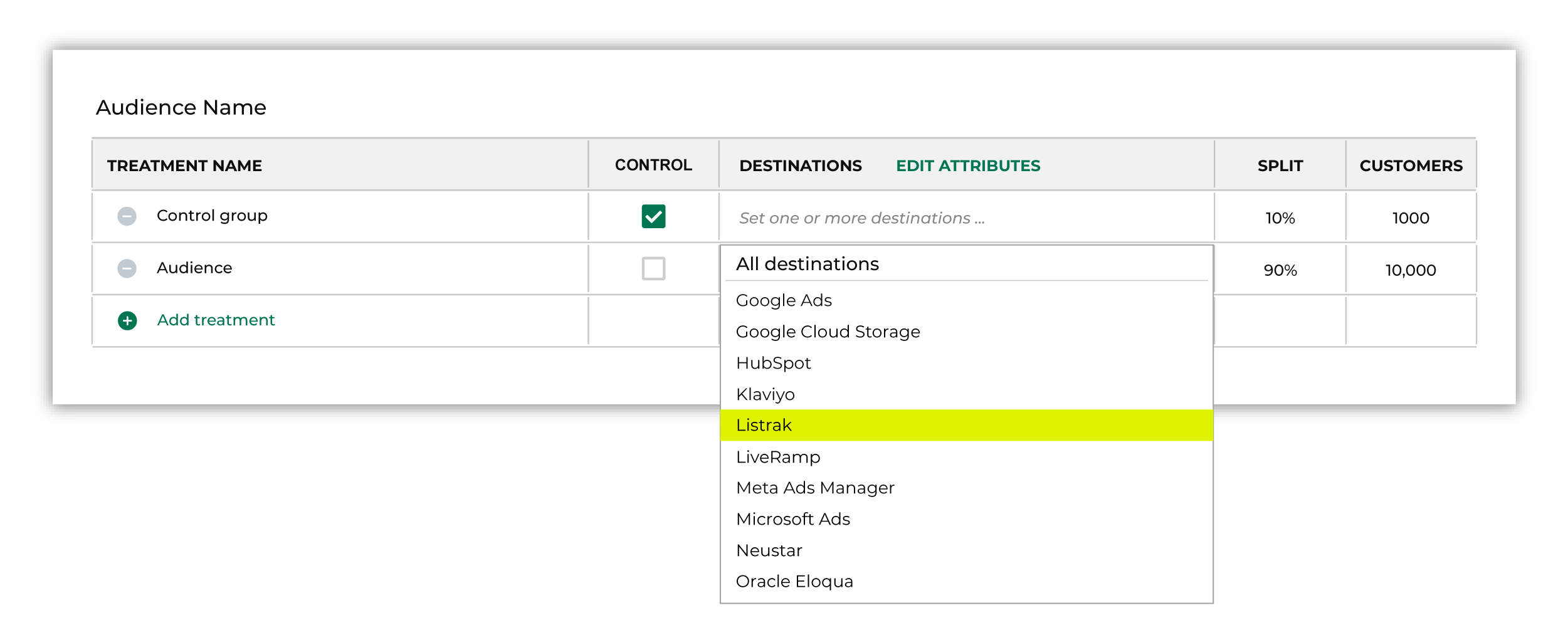
Note You may need to edit the attributes for the sub-audience to ensure Amperity is sending the right data to Listrak SMS. |

|
Click Edit attributes to review the attributes that Amperity sends to Listrak SMS. Listrak SMS requires phone numbers. You may include system and custom profile attributes. Amperity pre-selects the list of attributes sent to Listrak SMS. The Edit attributes page for Listrak SMS is similar to: 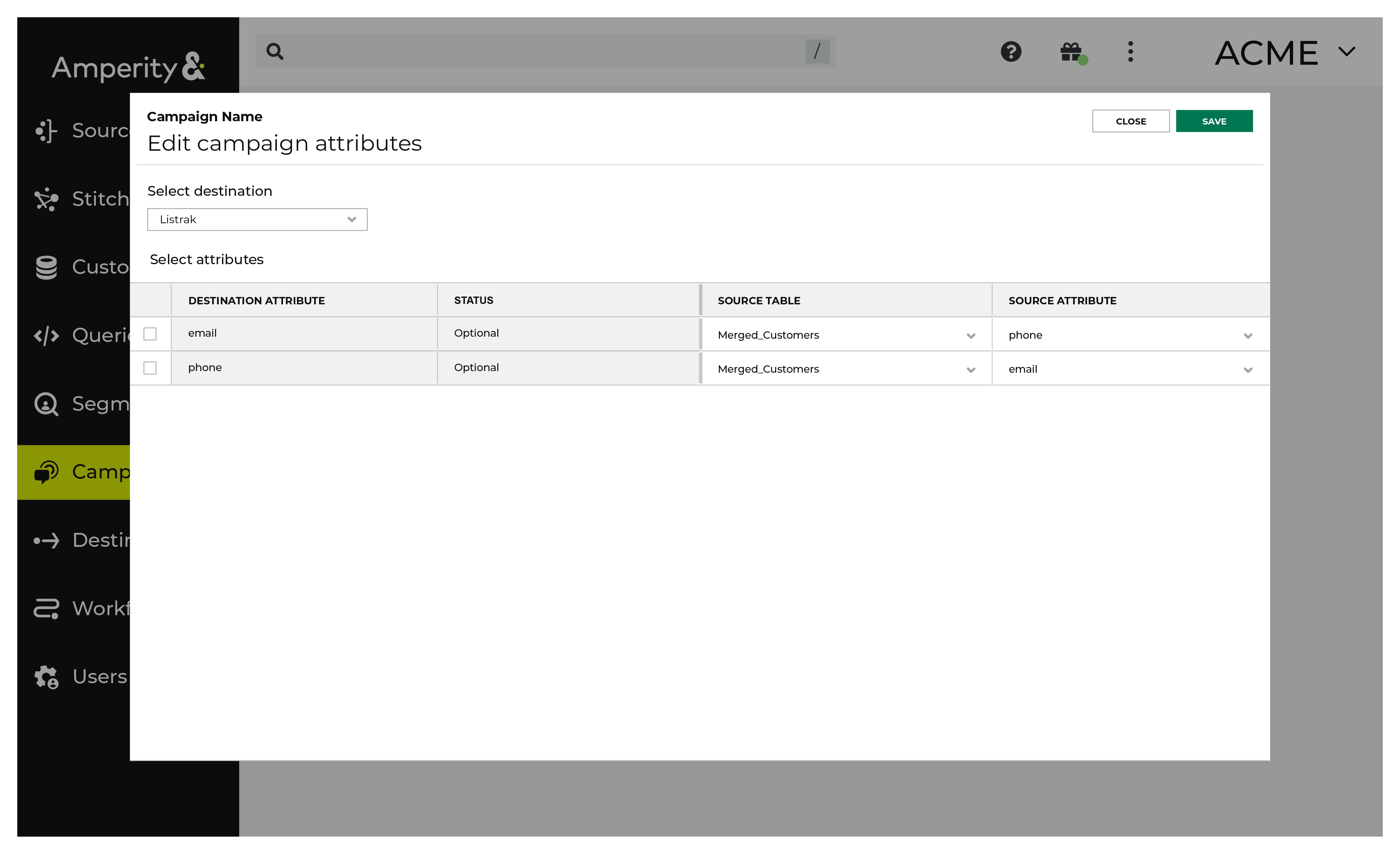
Note The Merged Customers table is the default table for sending data to Listrak SMS, even though segments are often built against the Customer 360 table. This is by design. The Merged Customers table is the underlying table for customer profile data and is the source for all customer profile data that exists within the Customer 360 table. |