
 User Guides



Send audiences to TikTok Ads Manager
Use segments to build high-value audiences for retargeting and lookalike modeling, and then use campaigns to send those audiences to TikTok Ads from Amperity. Marketers can use their best customers as a seed set for acquisition, which leads to improved match rates, stronger ROI, reduced onboarding costs, and stronger net new customer conversion.
Tip
Start with a balanced and stable audience. Allow that audience to complete its learning phase , which is a process TikTok Ads uses to optimize ad delivery for your audience.
Keep your audience stable during the learning phase and only make adjustments if your audience does not look like it will complete the learning phase, which typically ends after ~50 conversions.
Caution
To refresh audiences from Amperity, new one-time segment deliveries need to be created and uploaded to the client’s TikTok account.
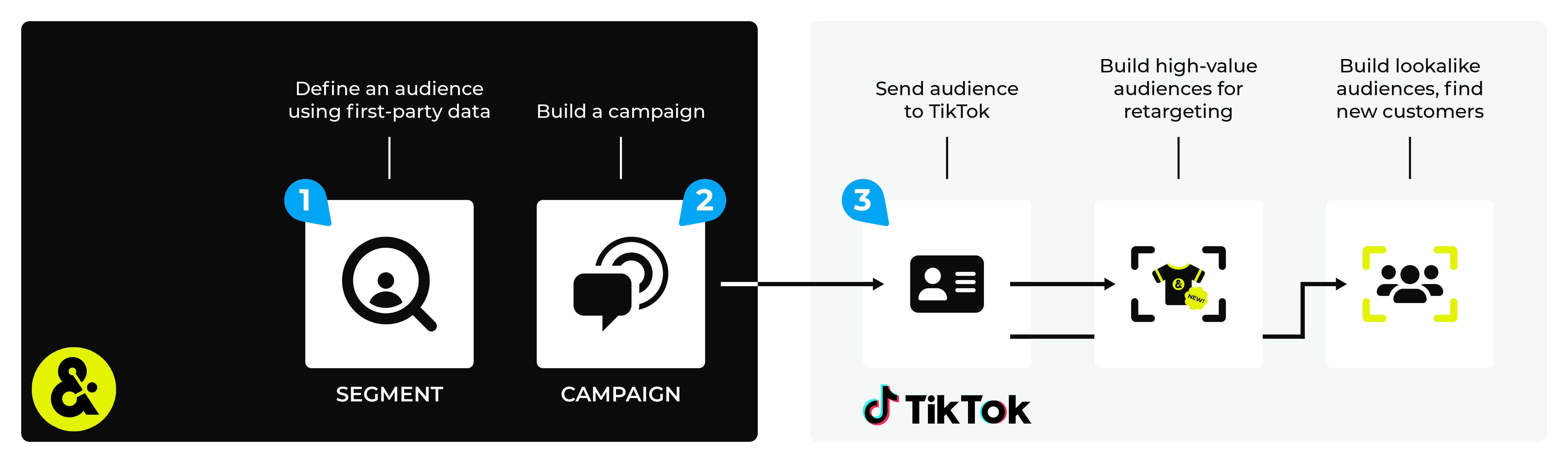
You can access your audiences from within TikTok Ads Manager by clicking Assets, and then Audiences. From the Audiences page you can select an audience, click Create Audience, and then create a lookalike audience or you can select many audiences, and then click Create Ad Group, after which you can launch your TikTok campaign.
Note
Amperity uses a combination of endpoints in the TikTok Ads Segment API to verify existing segments , add or update the list of customers to match the list of customers sent from Amperity, and then map many advertising account IDs to the same business account .
Changes to audience mapping are not immediately available in TikTok Ads. Allow for up to 10 hours after the point at which Amperity has finished sending audience updates for them to be available.
Important
Amperity requires access to TikTok Ads. This access may expire or be removed periodically, depending on how OAuth is managed at TikTok Ads. If Amperity is unable to send data to TikTok Ads ask your DataGrid Operator to reauthorize access to TikTok Ads.
Note
Ask your DataGrid Operator or your Amperity representative for help configuring TikTok Ads as a destination to which you can send campaigns for customer activation.
Caution
This destination is available for sending campaign audiences to TikTok Ads after it is configured by a Datagrid Operator or your Amperity representative.
If this destination cannot be selected from the campaigns editor or activations canvas ask your Datagrid Operator or Amperity representative to configure a destination for sending campaign audiences to TikTok Ads.
Build a segment
Use the Segment Editor to build any audience using a series of drop-downs and picklists.
As you define the attribute profile for an audience be sure to refresh segment insights to view audience size and to see the value it brings to your business.
When the segment is ready, activate it, and then use it use it in a campaign to send to your preferred destinations for customer activation.
Which attributes should you use?
You can use any attribute that is in your customer 360 database to define your audience.
When sending the list of customers who belong to this audience to TikTok Ads as part of a campaign you must choose specific attributes to send.
TikTok Ads supports the following attributes: email addresses, phone numbers, and advertising IDs (IDFAs for iOS devices or AAIDs for Android devices).
Important
Validate the audience with TikTok Ads by using a sample audience with a very small membership. For example: 10 or 100 members or the minimum audience size recommended by TikTok Ads. Send the sample audience to TikTok Ads and verify the sample audience is correct in TikTok Ads. Make adjustments if necessary. Only send full audiences after validation is complete.
Add to a campaign
Use the campaign editor to configure Amperity to send data to TikTok Ads. Add a segment, define exclusions and sub-audiences, and then define each audience sent to TikTok Ads.
Tip
Email addresses most often lead to the best match rates.
You may include, in addition to email addresses and phone numbers, mobile advertiser IDs (MAIDs) if they are available. Associate the MAIDs for Apple devices to IDFA and MAIDs for Google Android devices to AAID.
About paid media campaigns
Amperity provides the right set of data to support your brand’s paid media advertising with TikTok Ads.
Merged Customers vs. Unified Paid Media
The Merged Customers table has each of your customers’ best profiles, such as their best email address, best phone number, and best physical address.
The Unified Paid Media table has all your customer’s known profile data, including all known email addresses, all known phone numbers, and all known physical addresses.
You may configure campaigns to use Merged Customers, Unified Paid Media, or both, depending on your downstream use cases.
Use a consistent naming pattern to label when profiles are from the Merged Customers or Unified Paid Media tables. For example: “Best profile” or “Full profile”.
Configure default attributes for each destination.
Use the default attributes component on the Campaigns page to configure which attributes are associated with each destination, including the table from which those attributes are pulled.
The selected table will affect your brand’s downstream match rates and overall customer matches within your paid media campaigns. The decision behind which table to use depends on your brand’s downstream use case and the type and amount of customer profile data your brand wants to use to match customers.
You should expect to see higher match rates when sending audiences from the Merged Customers table, but a higher number of matched customer profiles when sending audiences from the Unified Paid Media table. Use A/B testing to compare the results from each table, after which you can use the audience that works best for your campaigns.
To add TikTok Ads to a campaign

|
Open the Campaign Editor. This is available from the Campaigns page. Click the Create campaign button in the top right corner of the page. |

|
Assign TikTok Ads as a destination for at least one treatment group. 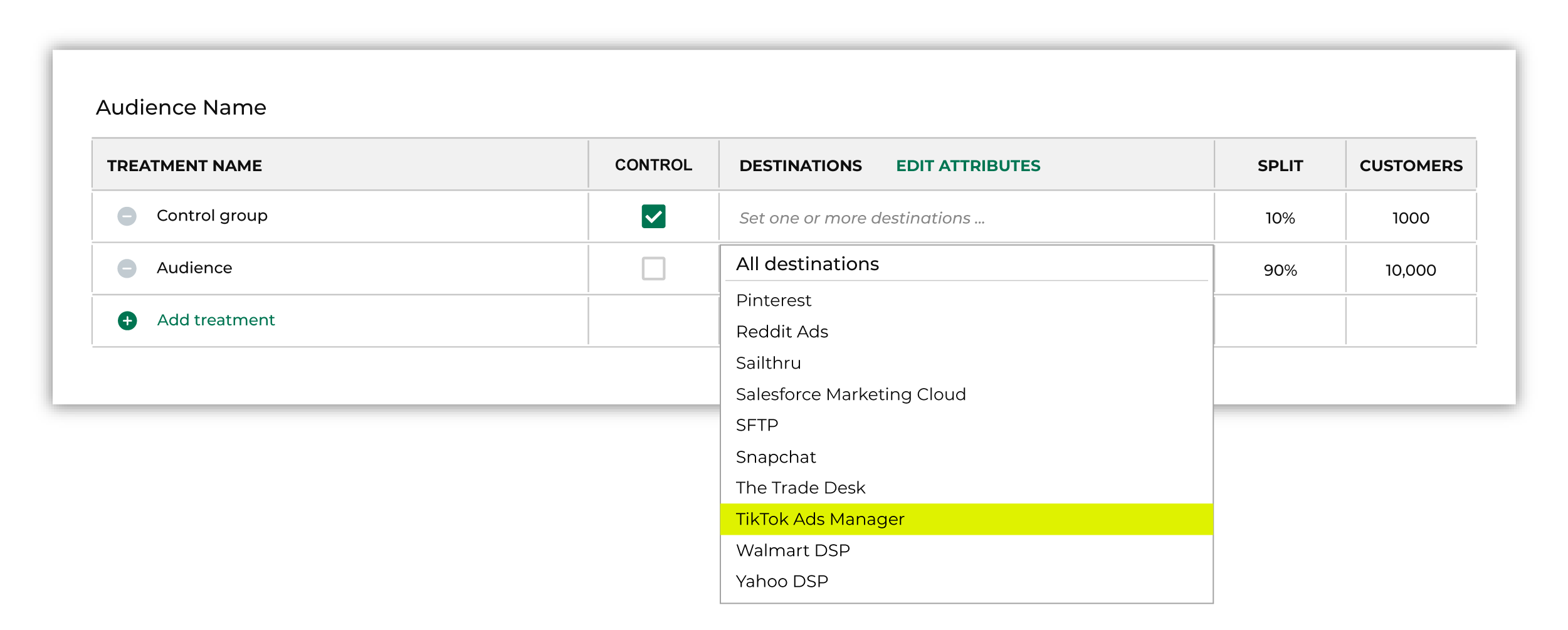
Note You may need to edit the attributes for the sub-audience to ensure Amperity is sending the right data to TikTok Ads. |

|
Click Edit attributes to review the attributes that Amperity sends to TikTok Ads. Send one of the following attributes to TikTok Ads: email address, phone number, or advertising ID (IDFA for iOS devices or AAID for Android devices). Amperity pre-selects the list of attributes sent to TikTok Ads. The Edit attributes page for TikTok Ads is similar to: 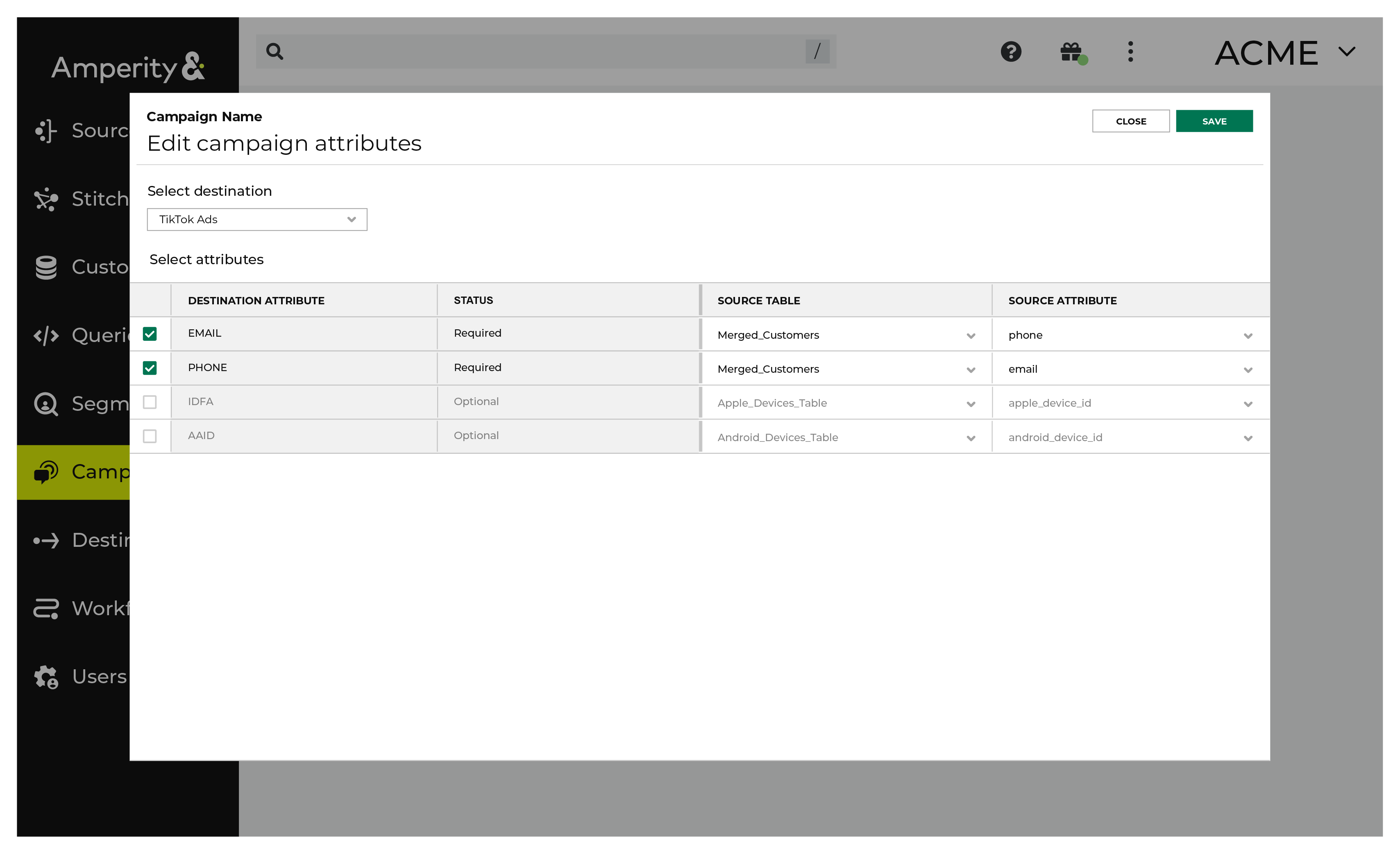
Note The Merged Customers table is the default table for sending data to TikTok Ads, even though segments are often built against the Customer 360 table. This is by design. The Merged Customers table is the underlying table for customer profile data and is the source for all customer profile data that exists within the Customer 360 table. |
Configure default attributes
Each unique destination configured to send treatment group audiences to TikTok Ads has a set of default attributes.
Configure default attributes by clicking the Default attributes link next to the Create campaign button on the Campaigns page.
The source table defaults to the Merged Customers table for most attributes. This is configurable.
TikTok Ads has the following requirements for attributes.
Source attribute |
Destination attribute |
|---|---|
phone |
PHONE |
Events parameters |
Optional. Review the list of events parameters your brand can send to TikTok Ads. These may be configured as default attributes in Amperity. |