
 Operators Guide



Send audiences to The Trade Desk Data Marketplace
The Trade Desk is a platform for wide internet advertising and enables the use of Universal ID 2.0 for first-party paid media advertising.
The Trade Desk Data Marketplace allows advertisers to purchase access to your brand’s audiences, and then use those audiences for their advertising campaigns.
Audience monetization generates revenue by packaging first-party data as audience products and making those audiences available in a data marketplace. Advertisers can pay to use these audiences in their marketing campaigns.
Use this destination to monetize your brand’s UID 2.0-based audiences by making them available for purchase by advertisers at various rates in The Trade Desk Data Marketplace.
What is UID 2.0?
Unified ID 2.0 is an open source identity framework that benefits consumers by allowing them to control over data sharing with publishers and advertisers.
The Trade Desk Data Marketplace supports using UID 2.0 to help establish your customers’ identifies without using third-party data. UID 2.0 enables publisher websites, mobile apps, and Connected TV (CTV) apps to monetize through programmatic workflows, while offering user transparency and privacy controls that meet local market requirements.
How this destination works
Send audiences to The Trade Desk Data Marketplace using the The Trade Desk Partner API to make ID-based audiences available to advertisers for more granular targeting.
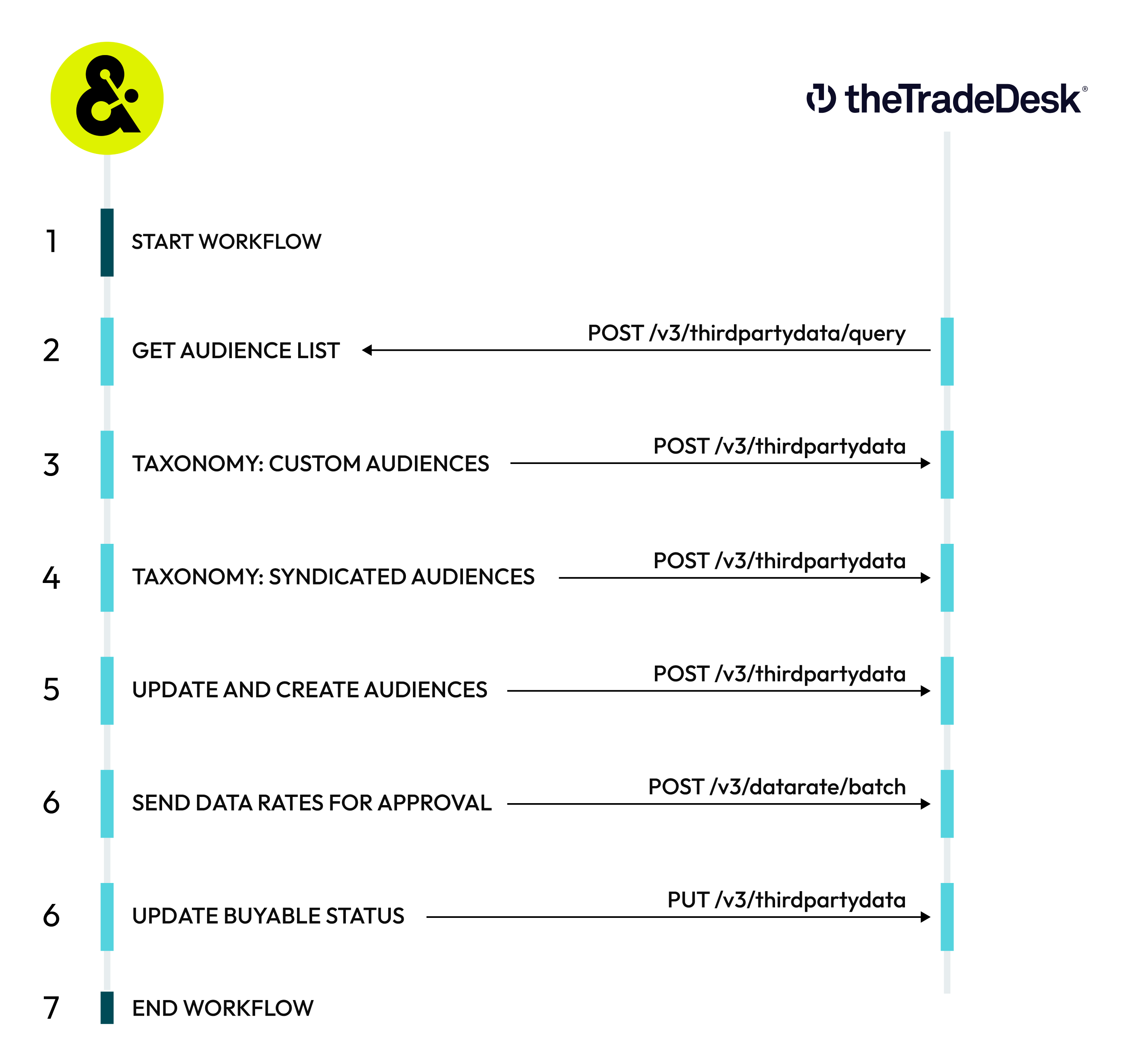
The Trade Desk Data Marketplace destination works like this:

|
START WORKFLOW A workflow starts on the configured schedule, such as “every 2 weeks at 4:00 PM UTC starting June 20, 2026”. Amperity uses specific endpoints in the The Trade Desk Platform API for this workflow: |
|
AUDIENCE LIST Amperity uses the POST /v3/thirdpartydata/query endpoint to retrieve a filterable list of audiences for a specific data provider. The status for each existing audience is returned, including taxonomy compliance status , if the audience is buyable , the number of active and received IDs , and the time at which the audience was last updated. |

|
TAXONOMY FOR CUSTOM AUDIENCES Amperity uses the POST /v3/thirdpartydata endpoint to identify the taxonomy location and buyable status for custom audiences. New custom audiences are added to the taxonomy starting at a custom location and must be buyable. |

|
TAXONOMY FOR SYNDICATED AUDIENCES Amperity uses the POST /v3/thirdpartydata endpoint to identify the taxonomy location and buyable status for syndicated audiences. New syndicated audiences are added to the taxonomy starting at the root of the taxonomy and must be buyable. |

|
UPDATE AND CREATE AUDIENCES Amperity uses the POST /v3/thirdpartydata endpoint to update and create audiences in The Trade Desk Data Marketplace. If an audience does not exist Amperity will create it. If an error occurs while creating an audience Amperity will retry using a custom taxonomy location at the root of the taxonomy. |

|
SEND DATA RATES FOR APPROVAL All buyable audiences must have an approved rate . Note The first syndicated rate submission for a brand requires approval. Tip Hybrid rates are required for syndicated audiences. An effective hybrid rate establishes a percent of media cost value that scales across media channels along with a CPM cap. As the value of an audience scales into premium high cost channels, audiences yield higher revenue. Flat CPM rates are optional for custom audiences. Amperity uses the POST /v3/datarate/batch endpoint to send data rates for processing and approval.
The following settings define the data rates sent for approval. Depending on the type of audience–custom or syndicated–and the intended consumer–partner or advertiser–some combination of the following settings define the data rate sent for approval. Cost per thousand (CPM)
Percent of media cost
|
Get details
Review the following details before configuring credentials for The Trade Desk Data Marketplace and before configuring Amperity to send UID2 tokens to The Trade Desk Data Marketplace.

|
UID2 Unified ID 2.0 (UID2) is an open-source framework that enables deterministic identity for advertising opportunities across the open internet for participants with access to the advertising ecosystem. UID2 is a standalone solution with a unique namespace and privacy controls that help participants meet local market requirements. To get access to the UID2 framework, you may sign up directly from the Unified ID 2.0 website or connect directly with your The Trade Desk representative (or UID2 administrator). You must agree to a UID2 participation policy, which is a requirement for UID2 sharing . Important Talk with your The Trade Desk representative if you are unsure of which participation policy is required to support your brand’s UID2 use cases. Each participant in UID2 has its own set of unique Mapper credentials , which allow access to specific areas within the UID2 ecosystem. To configure Amperity to act as a UID2 Operator for your brand you must be a Mapper participant in Unified ID 2.0. A mapper participant is a broad category that includes advertisers , data providers , data on-boarders, measurement providers, identity graph providers, third-party data providers, and any other organization that sends data to other participants and organizations that collect user data and push it to other UID2 participants. Important Use your brand’s Mapper participant credentials to configure Amperity to act as a UID2 Operator. |
|
|
Marketplace agreement A marketplace agreement . After the marketplace agreement is in place a Brand ID, Provider ID, and Provider secret are assigned. |
|
|
Credential settings Brand ID
Provider ID
Provider secret
Platform API token
|
|
|
Taxonomy The Trade Desk recommends designing and building a flat taxonomy , where all segments exist as children under the ROOT node, with segment names representing the full path.
|
|
|
Partner ID The partner ID for an account with The Trade Desk Data Marketplace. Note A Partner ID is required when Partner is selected as the Rate level. |
|
|
Advertiser ID The advertiser ID for an account with The Trade Desk Data Marketplace. Note An Advertiser ID is required when Advertiser is selected as the Rate level. |
|
|
Standard policies Audience monetization must be configured by a Datagrid Administrator or a Datagrid Operator with the Audience monetization access policy option enabled. Important Audience monetization cannot be configured in a sandbox. |
|
|
Amps consumption Your tenant must be configured for Amps consumption. |
Configure credentials
Configure credentials for The Trade Desk Data Marketplace before adding a destination.
An individual with access to The Trade Desk Data Marketplace should use SnapPass to securely share “advertiser ID”, “advertiser secret”, “provider ID”, and “platform API token” details with the individual who configures Amperity.
To configure credentials for The Trade Desk Data Marketplace
|
|
From the Settings page, select the Credentials tab, and then click the Add credential button. |
|
|
In the Create credential dialog box, do the following:
|
|
|
The settings that are available for a credential vary by credential type. For the “tradedesk-audience-monetization” credential type, configure settings, and then click Save. Brand ID
Provider ID
Provider secret
Platform API token
|
Add destination
The Trade Desk Data Marketplace has two types of audiences: custom and syndicated.
For custom audiences
Custom audiences have advertiser or partner-specific rates. Each custom audience is for purchase by a single buyer via a private deal on the data marketplace.
To create a custom audience
|
|
Create audience
|
|
|
Choose segments Do one of the following:
When finished, click Next. |
|
|
Select a marketplace Do one of the following:
Talk to your The Trade Desk representative for more information about defining percentage of media costs and effective rate caps for your audiences. Set a cadence and choose the date on which Amperity will start delivering audiences to the marketplace. When finished, click Next. |
|
|
Prepare data products
When finished, click Save and send. Note Audiences are added to the Audience Monetization folder on the Segments page. |
For syndicated audiences
Syndicated audiences have a standard global rate. They may be purchased on the data marketplace by any verified buyers not on your blocklist.
To create a syndicated audience
|
|
Create audience
|
|
|
Choose segments Do one of the following:
When finished, click Next. |
|
|
Select a marketplace Do one of the following:
Set a cadence and choose the date on which Amperity will start delivering audiences to the marketplace. When finished, click Next. |
|
|
Prepare data products
When finished, click Save and send. Note Audiences are added to the Audience Monetization folder on the Segments page. |