
 Operators Guide



Configure destinations for Listrak SMS profile updates
Listrak SMS is an automation platform for audience activation through mobile messaging campaigns and personalized SMS marketing.
Important
This destination only updates existing profiles in Listrak SMS. This connector does not create, delete, subscribe, or unsubscribe contacts. Use the Listrak SMS–List management destination to create, delete, subscribe or unsubscribe contacts.
Use the Listrak SMS REST API to update SMS profile attributes for contacts that already exist in Listrak SMS.
Amperity uses the Start a Contact Update Import endpoint to update an audience member’s information by {phoneNumber}.
How this destination works
This destination updates SMS profile attributes for existing contacts in Listrak SMS. It does not create new contacts, does not add contacts to lists, and does not change subscription status.
Audience members whose phone numbers do not already exist in Listrak SMS are dropped by the API.
Important
To avoid sending SMS messages to people who did not consent to receiving them, ensure only consented phone numbers are included in the data provided to Amperity, or maintain consent status as a separate attribute.
For example, bring Listrak subscriber status to Amperity as a data source, and then use that data source with the SMS Opt Status table to help ensure customers are filterable by subscriber status in queries and segments.
SMS opt-in requirements are different from email opt-in requirements and require separate consent tracking.
Amperity uses a specific endpoint in the Listrak SMS REST API to update SMS profiles in Listrak SMS.
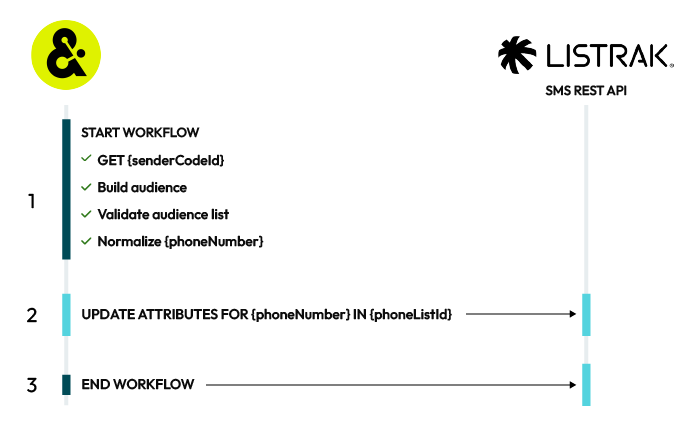
A Listrak SMS profile update destination works like this:

|
START WORKFLOW After the workflow starts, Amperity:
|
|
UPDATE ATTRIBUTES FOR {phoneNumber} All members of an audience in Listrak must have a phone number. In addition to phone numbers, you may send email addresses, first and last names, birthdates, and postal codes. Custom attributes may also be defined. When attributes for existing audience members change, Amperity will update the profile to match the updated attributes. For example, a custom attribute for “Most recent purchase” has an existing value of “Socktown 5-pack ankle” and Amperity updates the attribute to “Socktown 5-pack mid-calf”. Amperity uses the Start a Contact Update Import endpoint to update an audience member’s information by {phoneNumber}. All system fields (phone, email, first_name, last_name, birthdate, and postal_code) and custom fields are updated for all customers. Amperity does not change an audience member’s opt status. Important This destination only updates profile attributes for contacts that already exist in Listrak SMS. Audience members whose phone numbers do not exist in Listrak SMS are dropped. This destination never creates new contacts and never changes subscription status. |

|
END WORKFLOW The workflow ends when all attributes are updated for existing audience members. |
Get details
Review the following details before configuring credentials for Listrak SMS and before configuring Amperity to send phone numbers and SMS profile attributes to Listrak SMS.

|
Credential settings You must configure this destination for SMS profiles: SMS client ID and client secret
|
|
|
Define custom SMS profile attributes Custom SMS profile attributes must be created in Listrak SMS before Amperity can send custom attributes.
|
|
|
Required configuration settings Sender code ID
|
|
|
Audience configuration Use a query or a segment to build an audience to send to Listrak SMS. The phone field must be part of the audience. You may append additional profile attributes to the query or segment. |
About Listrak SMS profile attributes
Listrak SMS uses phone numbers as the primary identifier for each SMS profile.
Listrak SMS has the following SMS pre-defined attributes to collect additional information about SMS profiles.
System fields
Birthday Use for date-based segmentation.
Email Address A contact attribute.
First Name and Last Name Use for personalization.
Postal Code Use for location targeting.
Use system attributes to personalize messages, such as adding a first name to an SMS message, and to filter messages to only those who match certain criteria.
Custom attributes
Custom attributes sent from Amperity must match custom attributes that already exist in Listrak SMS.
Replace spaces in custom SMS profile field names with underscores in the Amperity SQL query. For example, a custom SMS profile field is named “Loyalty Tier” in Listrak SMS. Alias the field name in the query using underscores:
current_tier AS Loyalty_Tier
Configure credentials
Configure credentials for Listrak SMS before adding a destination.
An individual with access to Listrak SMS should use SnapPass to securely share “refresh token” details with the individual who configures Amperity.
To configure credentials for Listrak SMS
|
|
From the Settings page, select the Credentials tab, and then click the Add credential button. |
|
|
In the Credentials settings dialog box, do the following: From the Plugin dropdown, select Listrak SMS. Assign the credential a name and description that ensures other users of Amperity can recognize when to use this destination. |
|
|
The settings that are available for a credential vary by credential type. For the “listrak-sms” credential type, configure settings, and then click Save. You must configure this destination for SMS profiles: SMS client ID and client secret
|
Add destination
Use a sandbox to configure a destination for Listrak SMS. Before promoting your changes, send a sample audience, and then verify the results in Listrak SMS. After verifying the end-to-end workflow, push the destination from the sandbox to production.
To add a destination for Listrak SMS profile updates
|
|
Open the Destinations page, select the New destinations button, and then select Orchestration. 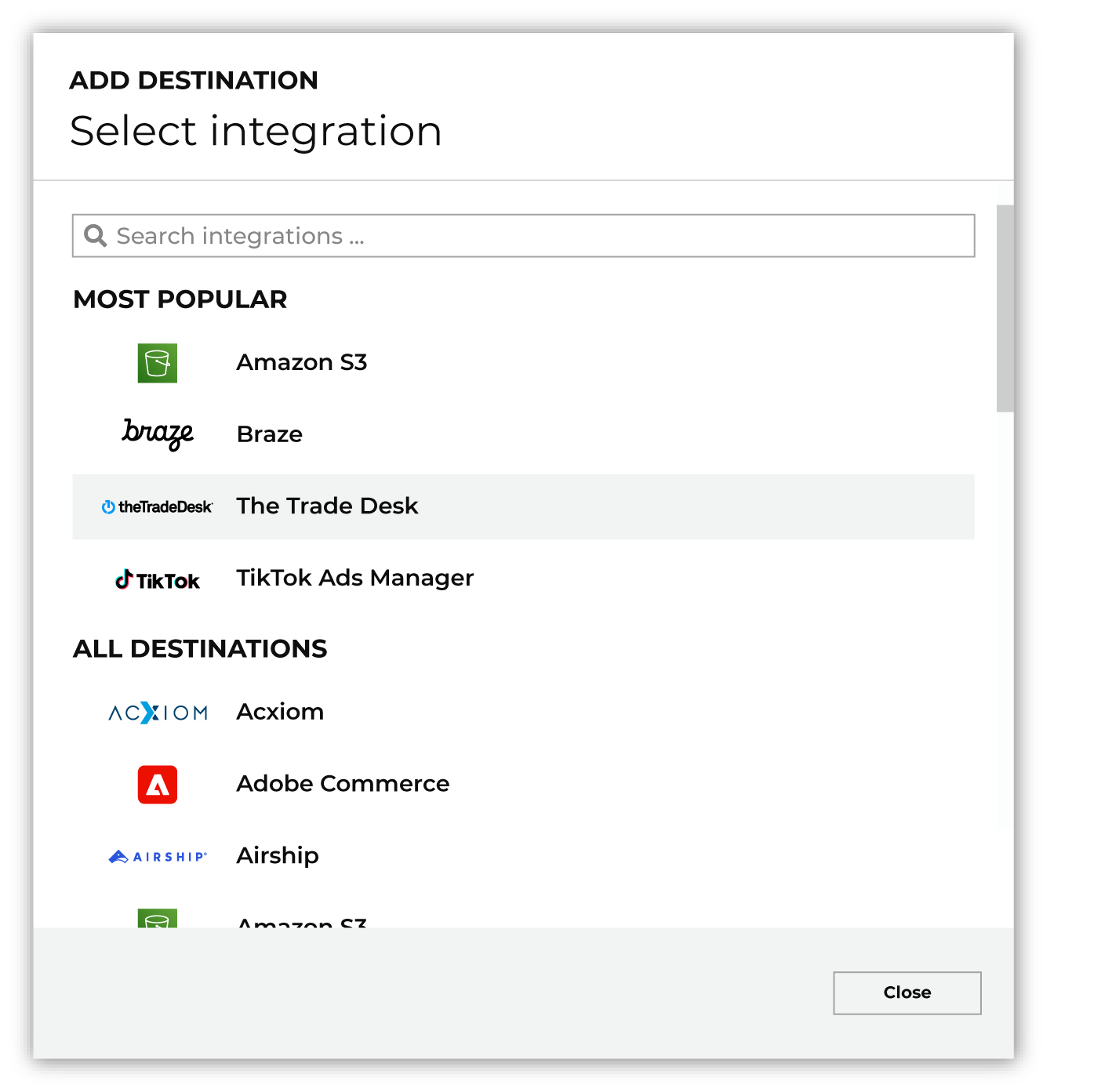
To configure a destination for Listrak SMS, do one of the following:
|
|
|
Select the credential for Listrak SMS from the Credential dropdown, and then click Continue. Tip Amperity validates the connection when the destination is saved. If the connection cannot be validated, an error is shown and the destination is not saved. |
|
|
In the “Destination settings” dialog box, assign the destination a name and description that ensures other users of Amperity can recognize when to use this destination. Configure business user access By default a destination is available to all users who have permission to view personally identifiable information (PII). Enable the Admin only checkbox to restrict access to only users assigned to the Datagrid Operator and Datagrid Administrator policies. Enable the PII setting checkbox to allow limited access to PII for this destination. Use the Restrict PII access policy option to prevent users from viewing data marked as PII anywhere in Amperity and from sending data to downstream workflows. |

|
Configure the following settings, and then click “Save”. Sender code ID
Audience primary key
|

|
After configuring this destination users may use:
|

|
Validate the audience with Listrak SMS by using a sample audience with a very small membership. For example: 10 or 100 members or the minimum audience size recommended by Listrak SMS. Send the sample audience to Listrak SMS and verify the sample audience is correct in Listrak SMS. Make adjustments if necessary. Only send full audiences after validation is complete. |